OpenAI 兼容 API
KsADK 本地运行时暴露三个 OpenAI 兼容 endpoint,供开发和调试使用。公开文档中只有 协议形态可以称为 OpenAI 兼容;SDK 特定字段要标记为 KsADK 扩展。
鉴权:Bearer Token
托管运行时要求 Authorization: Bearer <token>。本地开发 server 默认不强制鉴权,但
上线时由 gateway 注入并校验 Bearer。客户端应始终携带,避免本地与托管行为不一致。
调用前先启动本地 server:
agentengine run . --port 8080Endpoint 摘要
| Endpoint | 方法 | 用途 |
|---|---|---|
/v1/responses | POST | Responses 风格本地 Agent 调用(首选) |
/v1/chat/completions | POST | Chat Completions 兼容客户端 |
/v1/models | GET | 列出可用模型目录 |
/v1/responses 是推荐的本地运行时协议;/v1/chat/completions 面向既有 Chat 客户端;
/v1/models 返回当前 model catalog(含 current/source 本地扩展)。
请求生命周期
POST /v1/responses
POST /v1/responses 是推荐的本地运行时协议。支持非流式 JSON、流式 SSE,以及
checkpoint resume 与 approval payload。
请求体字段(基于 ResponsesRequest schema):
| 字段 | 类型 | 必填 | 说明 |
|---|---|---|---|
input | string | object | array | 是 | 字符串、message object 或 input item list |
model | string | 否 | 模型或 Agent 名称覆盖;缺省取运行时默认 |
stream | boolean | 否 | true 返回 SSE,默认 false |
instructions | string | 否 | 附加系统级 instruction |
metadata | object | 否 | 调用方 metadata,运行时会保留并透传 |
conversation | string | {id} | 否 | conversation id 或带 id 的对象(优先于 session_id) |
previous_response_id | string | 否 | 上一响应引用;与 conversation 互斥 |
session_id | string | 否 | 旧本地 session id;优先使用 conversation |
user | string | 否 | 调用方/user 标识,缺省 user |
safety_identifier | string | 否 | 安全标识,回退为 user_id |
prompt_cache_key | string | 否 | prompt cache key,写入 metadata |
store | boolean | 否 | 是否持久化,写入 metadata |
model_metadata | object | 否 | KsADK 扩展:模型能力提示 |
model_options | object | 否 | KsADK 扩展:provider 特定选项透传 |
account_id | string | 否 | KsADK 扩展(0.6.5+):按账号隔离 Skill/Workspace/Sandbox/Memory |
字段互斥
conversation 与 session_id 不能冲突;conversation 与 previous_response_id
互斥。同时出现且指向不同 session 时,运行时返回 400。
最小请求:
{
  "model": "my-agent",
  "input": "Explain what this agent can do.",
  "stream": false
}
带 conversation 与 account_id:
{
  "model": "my-agent",
  "conversation": {"id": "local-demo-session"},
  "input": "Continue from the previous answer.",
  "account_id": "acct_42",
  "stream": false
}
非流式响应返回 OpenAI 兼容顶层字段,加少量 KsADK 扩展:
| 字段 | 状态 | 说明 |
|---|---|---|
id | compatible | 运行时生成的 response id,形如 resp_<hex> |
object | compatible | response |
created_at | compatible | 创建时间 |
status | compatible | completed / failed / incomplete |
model | compatible | 本次请求使用的模型或 Agent |
output | compatible | output item,通常是 assistant message |
metadata | compatible | 调用方 metadata;KsADK 0.6.9+ 会在可用时追加 metadata.last_usage |
usage | compatible-shaped | 可用时的本轮累计 usage,用于统计本次响应真实消耗 |
output_text | KsADK 扩展 | 拼接后的便捷文本 |
session_id | KsADK 扩展 | 本地 session id |
{
  "id": "resp_a1b2c3",
  "object": "response",
  "created_at": 1719900000,
  "status": "completed",
  "model": "my-agent",
  "output": [
    {
      "type": "message",
      "role": "assistant",
      "content": [
        {"type": "output_text", "text": "This agent can..."}
      ]
    }
  ],
  "usage": {
    "input_tokens": 1250,
    "output_tokens": 180,
    "total_tokens": 1430,
    "input_token_details": {"cached": 900}
  },
  "metadata": {
    "last_usage": {
      "input_tokens": 980,
      "output_tokens": 180,
      "total_tokens": 1160,
      "input_token_details": {"cached": 700}
    }
  },
  "output_text": "This agent can...",
  "session_id": "local-demo-session"
}
追求广泛兼容的消费者应优先读取 output,把 output_text 视为便捷字段。
usage 与 last_usage
usage 保持 OpenAI 风格的本轮累计 usage(agent loop 内多次 LLM 调用会累加)。
metadata.last_usage 是 KsADK 扩展,表示最后一次 LLM 调用的 usage 快照,用于
上层计算当前上下文窗口占用;它不是会话累计值。
stream: true 时返回 text/event-stream。运行时把流式 chunk 序列化为
Responses 风格 SSE 事件。
curl -N http://127.0.0.1:8080/v1/responses \
  -H 'Content-Type: application/json' \
  -d '{"model":"my-agent","input":"count to three","stream":true}'
SSE 输出示例(每个 data: 一行 JSON,空行分隔):
event: response.created
data: {"type":"response.created","response":{"id":"resp_a1b2c3","status":"in_progress"}}

event: response.output_text.delta
data: {"type":"response.output_text.delta","delta":"one"}

event: response.output_text.delta
data: {"type":"response.output_text.delta","delta":"two"}

event: response.completed
data: {"type":"response.completed","response":{"id":"resp_a1b2c3","status":"completed"}}
invocation_id 透传(0.6.5+)
在 metadata.agentengine.invocation_id 中传入自定义 invocation id,运行时会原样
透传给 runner,用于 transcript 分组与事件续订。未提供时运行时自动生成。
错误响应使用标准 HTTP 状态码 + JSON detail:
| 状态码 | 场景 | detail 示例 |
|---|---|---|
400 | conversation 与 session_id 冲突 | Responses field 'conversation' conflicts with ksadk legacy field 'session_id'. |
400 | conversation 与 previous_response_id 同用 | Responses fields 'conversation' and 'previous_response_id' cannot be used together. |
400 | conversation 类型非法 | Responses field 'conversation' must be a string or an object with an 'id'. |
404 | checkpoint resume 找不到 session/checkpoint | Checkpoint not found |
409 | checkpoint resume 已在运行 | {"code":"resume_already_running",...} |
500 | Runner 未初始化或加载失败 | Runner 未初始化 |
{
  "detail": "Responses field 'conversation' conflicts with ksadk legacy field 'session_id'. Use 'conversation' for OpenAI-compatible calls."
}
Input Items 形态
input 可以是字符串、message object 或 input item 数组。多模态示例使用
OpenAI 兼容 content block:
{
  "model": "my-agent",
  "input": [
    {
      "role": "user",
      "content": [
        {"type": "input_text", "text": "Describe this image."},
        {"type": "input_image", "image_url": "data:image/png;base64,..."}
      ]
    }
  ]
}
文件示例:
{
  "model": "my-agent",
  "input": [
    {
      "role": "user",
      "content": [
        {"type": "input_text", "text": "Summarize this file."},
        {
          "type": "input_file",
          "filename": "notes.txt",
          "file_data": "data:text/plain;base64,..."
        }
      ]
    }
  ]
}
远程 file_url 保留为引用。KsADK 不在公开文档中承诺本地运行时会为附件处理任意抓取
远程文件;需要本地附件处理时使用 file_data 或本地 upload reference。
Resume 与审批输入
运行时识别 input 中常见 resume payload,包括 function call output 与 MCP 审批:
{
  "type": "function_call_output",
  "call_id": "call_123",
  "output": "approved result"
}{
"type": "mcp_approval_response",
"approval_request_id": "approval_123",
"approve": true,
"reason": "Approved by local user"
}这些 payload 作为 resume input 传给框架 adapter。业务特定审批语义仍由应用代码负责。
- 在
/v1/responses的input中放入 resume payload(如function_call_output)。 - 运行时调用
extract_responses_resume_input识别 resume 类型。 - 若为 checkpoint resume,运行时按
session_id+run_id+checkpoint_id定位。 - 找到后转为 runner resume input,跳过新消息规范化。
- Runner 在原 checkpoint 上续跑,而非重新开始。
POST /v1/chat/completions
POST /v1/chat/completions 兼容使用 Chat Completions 的客户端。支持流式与非流式。
请求体字段(基于 ChatCompletionRequest schema):
| 字段 | 类型 | 必填 | 说明 |
|---|---|---|---|
messages | array | 是 | chat message list |
model | string | 否 | 模型或 Agent 名称覆盖 |
stream | boolean | 否 | true 返回 SSE,默认 false |
user | string | 否 | 调用方/user 标识,缺省 user |
temperature | number | 否 | provider 选项,默认 0.7 |
max_tokens | integer | 否 | provider 选项 |
session_id | string | 否 | KsADK 扩展:本地 session id |
model_metadata | object | 否 | KsADK 扩展:模型能力提示 |
model_options | object | 否 | KsADK 扩展:provider 特定运行时选项 |
account_id | string | 否 | KsADK 扩展(0.6.5+):按账号隔离 |
{
  "model": "my-agent",
  "messages": [
    {"role": "user", "content": "Say hello from KsADK."}
  ],
  "stream": false,
  "account_id": "acct_42"
}
多模态 Chat 风格 content block:
{
  "model": "my-agent",
  "messages": [
    {
      "role": "user",
      "content": [
        {"type": "text", "text": "What is in this image?"},
        {"type": "image_url", "image_url": {"url": "data:image/png;base64,..."}}
      ]
    }
  ]
}
非流式响应返回 Chat Completions 兼容形态:
{
  "id": "chatcmpl-<uuid>",
  "object": "chat.completion",
  "created": 1719900000,
  "model": "my-agent",
  "choices": [
    {
      "index": 0,
      "message": {
        "role": "assistant",
        "content": "Hello from KsADK!"
      },
      "finish_reason": "stop"
    }
  ],
  "session_id": "<resolved-session-id>"
}
运行时把支持的 Chat Completions 请求转换为 KsADK canonical runner input。
stream: true 时返回 text/event-stream,使用 Chat Completions 风格 chunk:
curl -N http://127.0.0.1:8080/v1/chat/completions \
  -H 'Content-Type: application/json' \
  -d '{
    "model": "my-agent",
    "messages": [{"role": "user", "content": "count to three"}],
    "stream": true
}'data: {"id":"chatcmpl-abc","object":"chat.completion.chunk","created":1719900000,"model":"my-agent","choices":[{"index":0,"delta":{"role":"assistant"},"finish_reason":null}]}
data: {"id":"chatcmpl-abc","object":"chat.completion.chunk","created":1719900000,"model":"my-agent","choices":[{"index":0,"delta":{"content":"one"},"finish_reason":null}]}
data: {"id":"chatcmpl-abc","object":"chat.completion.chunk","created":1719900000,"model":"my-agent","choices":[{"index":0,"delta":{"content":"two"},"finish_reason":null}]}
data: {"id":"chatcmpl-abc","object":"chat.completion.chunk","created":1719900000,"model":"my-agent","choices":[{"index":0,"delta":{},"finish_reason":"stop"}]}
data: [DONE]| 状态码 | 场景 | 说明 |
|---|---|---|
400 | messages 缺失或非法 | Pydantic 校验失败 |
500 | Runner 未初始化或加载失败 | Runner 未初始化 |
{
  "detail": "Runner 未初始化"
}
GET /v1/models
列出当前可用模型目录。本地运行时会优先从 OPENAI_BASE_URL/OPENAI_API_BASE 拉取上游
/v1/models,失败时回退到本地 MODEL_NAME 单项 catalog。
curl http://127.0.0.1:8080/v1/models{
"object": "list",
"data": [
{"id": "deepseek-v3.2", "object": "model", "owned_by": "kspmas"}
],
"current": "deepseek-v3.2",
"source": "MODEL_NAME"
}| 字段 | 说明 |
|---|---|
object | list |
data | 模型数组,每项含 id、object、owned_by 等 canonical metadata |
current | KsADK 扩展:当前生效模型 id |
source | KsADK 扩展:来源环境变量名(OPENAI_MODEL_NAME / MODEL_NAME / COZE_MODEL_NAME) |
Streaming 事件参考
/v1/responses 流式事件名遵循 OpenAI Responses 风格:
| Event | 含义 |
|---|---|
response.created | response object 已分配 |
response.in_progress | 模型或 Agent 执行开始 |
response.output_item.added | output item 开始 |
response.content_part.added | message content part 开始 |
response.output_text.delta | 文本 delta |
response.output_text.done | 文本内容完成 |
response.reasoning.delta | reasoning delta;thinking 禁用时不发出 |
response.function_call_arguments.delta | function-call 参数 delta |
response.function_call_arguments.done | function-call 参数完成 |
response.ksadk.tool_result | KsADK tool result 扩展 |
response.incomplete | 中断或等待审批/resume |
response.completed | 最终成功响应 |
response.failed | 终态错误 |
客户端应忽略自己不支持的未知事件,以便兼容未来 Runner 事件类型。
KsADK 扩展字段
model_metadata、model_options、account_id、session_id、output_text 等是
KsADK 扩展,不应描述成 OpenAI 官方字段。
account_id 透传(0.6.5+)
account_id 按账号边界隔离 Skill / Workspace / Sandbox / Memory,写入运行时
PlatformInvocationContext。/v1/responses 与 /v1/chat/completions 均支持。
invocation_id 透传(0.6.5+)
在 metadata.agentengine.invocation_id 中传入自定义 invocation id,运行时原样透传给
runner,用于 transcript 分组与事件续订。未提供时运行时自动生成。
thinking 禁用注入(0.6.7)
model_options 透传 provider 特定选项。0.6.7 起,当 thinking 被禁用
(reasoning.effort=none、thinking.type=disabled 或 max_reasoning_tokens<=0)时,
runtime 自动向 extra_body 注入 enable_thinking=false 与
chat_template_kwargs.enable_thinking=false(DeepSeek 兼容),并过滤流式 reasoning
output item。
- CHAT 风格
reasoning.effort取值:low/medium/high/none - Responses 风格取值:
none/minimal/low/medium/high/xhigh
response.reasoning.delta 事件在 thinking 禁用时不发出(被运行时过滤)。
实现边界
运行时把协议处理器收到的请求规范化为统一 runner payload,再通过窄接口调用当前框架 Runner:
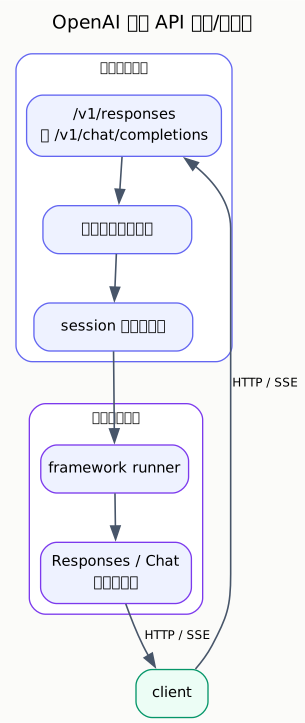
公开契约是 endpoint 行为。内部事件名、session 存储细节和 runner payload 扩展可能在 不同 release 中演进。