Attachments And Multimodal Input
KsADK normalizes text, image, file, and uploaded attachment inputs before they reach a framework runner. Local UI, Responses API, Chat Completions, and ADK-style parts all share one execution path.
Application code should use the normalized runner payload instead of branching on which public protocol the client used. See Consume Structured Attachment Fields.
Recommended Practices
- Route image analysis to a vision-capable model (see Default Multimodal Model).
- Do not paste large files directly into the prompt; extract a summary or structured content first.
- When a tool needs a file, use the workspace or an attachment reference; do not guess browser upload paths.
- Do not write attachment bytes into long-term memory.
Input Shapes
Common protocol shapes:
{"type": "input_text", "text": "..."}{"type": "input_image", "image_url": "data:image/png;base64,..."}{"type": "input_file", "filename": "note.txt", "file_data": "data:text/plain;base64,..."}File metadata and workspace references such as ksadk-upload://<file_id>.
Business agents should handle missing, expired, or unsupported attachment references and return a clear error.
Normalization Flow
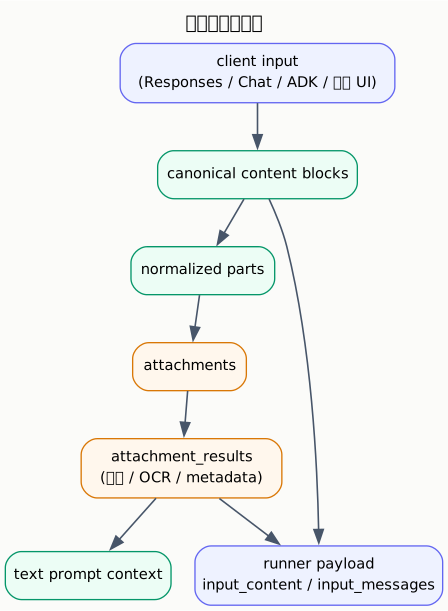
The runner receives both canonical content (input_content, input_messages)
and structured attachment results (attachment_results,
current_attachment_results).
Protocol Mapping
KsADK accepts several client representations, then maps them into the same internal attachment path:
| Client surface | Example field | Canonical meaning |
|---|---|---|
| Responses | input[].content[].type=input_image | image input block |
| Responses | input[].content[].type=input_file | file input block |
| Chat Completions | messages[].content[].type=image_url | image input block |
| ADK-style part | inlineData | inline bytes with MIME type |
| ADK-style part | fileData | uploaded or referenced file |
| Local Web UI | ksadk-upload://... | runtime-local upload reference |
| Hosted UI | ae-upload://... | hosted upload reference (0.6.6 unified resolution) |
Application code should use the normalized runner payload, not branch on which public protocol the client used.
Unified URI Resolution
New in 0.6.6
The runtime resolves local ksadk-upload:// and hosted ae-upload://
URIs through one unified path. Application code no longer needs to branch on
the URI prefix.
| URI scheme | Source | Resolution behavior |
|---|---|---|
ksadk-upload://<file_id> | local Web UI upload, written to the local files/ directory and mirrored to KS3 | read local cache first, fall back to KS3 via metadata when missing |
ae-upload://<file_id> | hosted runtime upload, object storage on the platform side | download the byte stream via the KOP Action AttachmentContent, then materialize it to the local cache (.meta.json) |
paths without the ae-upload:// prefix | workspace-relative paths | resolved against the workspace root |
Benefits of unified resolution:
- After a session switch or browser refresh, the runner and workspace preview can
still read real file content through
file_uri. - Hosted attachments are materialized to the local
files/directory on first resolution; subsequent reads use the local cache instead of re-downloading. - Application code does not need to distinguish local from hosted: hand the
file_urito the runtime for resolution.
Public surface
ksadk-upload:// and ae-upload:// are not publicly addressable URLs; they
are only valid inside the runtime that created them. Do not present them as
durable links in public docs and examples.
Responses Examples
Text plus image:
{
  "model": "my-agent",
  "input": [
    {
      "role": "user",
      "content": [
        {"type": "input_text", "text": "Describe this image."},
        {
          "type": "input_image",
          "image_url": "data:image/png;base64,..."
        }
      ]
    }
  ],
  "stream": false
}
Text plus file:
{
  "model": "my-agent",
  "input": [
    {
      "role": "user",
      "content": [
        {"type": "input_text", "text": "Summarize this note."},
        {
          "type": "input_file",
          "filename": "note.txt",
          "file_data": "data:text/plain;base64,..."
        }
      ]
    }
  ]
}
Upload Then Reference
The local Web UI can upload a file and receive a URI:
{
  "FileData": {
    "fileUri": "ksadk-upload://abc123",
    "displayName": "contract.pdf",
    "mimeType": "application/pdf",
    "sizeBytes": 102400
  }
}
A later request can reference it:
{
  "type": "input_file",
  "filename": "contract.pdf",
  "file_url": "ksadk-upload://abc123"
}
Attachment Results
Each extracted attachment result can include:
| Field | Meaning |
|---|---|
display_name | file name shown to users |
mime_type | detected or provided MIME type |
transport | inline or reference |
file_uri | reference URI when available |
size_bytes | file size |
kind | text, document, image, archive, or binary |
status | ok, partial, or failed |
warnings | extraction warnings |
extraction_method | parser or OCR path used |
text | extracted text, when available |
text_excerpt | short display/search excerpt |
Text and document content may be truncated. Business code should handle missing or partial extraction results.
Inline Data Versus References
KsADK supports two attachment transport styles:
| Transport | Example | Use when |
|---|---|---|
| inline | file_data: "data:text/plain;base64,..." | small local examples, tests, direct API calls |
| reference | file_url: "ksadk-upload://..." | Web UI upload flows and larger local files |
Inline data is self-contained but increases request size. References keep the
request small, but they are only meaningful to the runtime that created the
upload reference. Public docs should not present ksadk-upload://... as a
durable URL.
AttachmentContent Endpoint
The hosted runtime downloads ae-upload:// attachment bytes through the KOP
Action endpoint:
GET /agentengine/api/v1/AttachmentContent?FileUri=<uri>| Parameter | Meaning |
|---|---|
FileUri | attachment URI, typically ae-upload://<file_id>; paths without the ae-upload:// prefix are resolved as workspace-relative paths |
The response is a byte stream. Content-Type reflects the real MIME type and
Content-Disposition carries the original file name.
Local cache materialization
When resolving an ae-upload:// URI, the runtime materializes the downloaded
bytes to the local files/ directory and writes a <file_id>.meta.json
recording backend=hosted, display_name, mime_type, size_bytes, and
local_path. After a session switch or browser refresh, the runner and
workspace preview read real file content from the local cache without
re-downloading.
Consume Structured Attachment Fields
Business agents should not guess upload paths or parse file_uri themselves. Consume the structured attachment fields from the runner payload instead:
| Field | Use when |
|---|---|
current_attachments | processing only files/images uploaded in the current user turn |
current_attachment_results | processing only the extraction results (text/OCR/metadata) of the current turn |
attachments | the effective file context for this turn (including session carryover) |
attachment_results | follow-up questions that should keep working with the prior file |
def ksadk_prepare_state(payload: dict, session_context: dict) -> dict:
    return {
        "messages": payload.get("input_messages", []),
        # only files uploaded in the current turn
        "files": payload.get("current_attachment_results", []),
        # historical attachment context still reachable on follow-ups
        "file_context": payload.get("attachment_results", []),
}- Use
current_attachment_resultsfor workflows such as "process the file I just uploaded". - Use
attachment_resultsfor follow-ups such as "now summarize the second section";current_attachment_resultsis expected to be empty on a text-only follow-up. - When a tool needs a file handle, take the
file_urifromcurrent_attachments/attachmentsand hand it to the runtime for unified resolution.
Do not assemble host-absolute paths yourself or parse file_uri manually. Hand file_uri to the runtime for unified resolution.
Display Content Versus Runner Content
The runtime keeps separate views of an uploaded file:
| View | Purpose |
|---|---|
display_content | short user-visible message text and attachment names |
| prompt attachment text | extracted or summarized text added to the runner prompt |
attachment_results | structured metadata, extraction status, warnings, and text excerpts |
current_attachment_results | structured results only for files in the current user turn |
This separation avoids flooding the UI transcript with extracted document text
while still giving the runner enough context to answer file-related questions.
If your agent needs exact structured file metadata, read
attachment_results instead of parsing the display text.
Supported Extraction Paths
| Attachment | Typical handling |
|---|---|
| text files | decode text using common encodings |
| native text extraction, with OCR fallback when available | |
| DOCX/PPTX/XLSX/HTML | document-specific text extraction |
| images | OCR when OCR dependencies are available |
| ZIP | safe enumeration with path and size restrictions |
| binary files | metadata and warnings only |
ZIP handling is intentionally conservative: path traversal, nested archives, executable entries, large entries, and excessive total extracted size are blocked.
ZIP And Archive Boundaries
Archive handling is optimized for safe inspection, not arbitrary extraction. The runtime may list or extract text-like entries, but it can reject:
- path traversal entries.
- nested archives.
- executable files.
- very large entries.
- archives whose total expanded size exceeds local limits.
Treat archive results as partial unless status is ok and no warnings are
present. Agents should ask the user for a narrower file or a direct text export
when archive extraction is incomplete.
Runner Payload Fields
Framework adapters receive these file-related fields:
| Field | Use when |
|---|---|
input_content | preserving Responses-style multimodal blocks |
input_messages | passing message-native state into LangGraph or a model client |
attachments | using the effective file context for this turn |
attachment_results | reading extracted text, OCR, or document metadata |
current_attachments | checking files uploaded in the current user turn only |
current_attachment_results | processing only newly uploaded files |
has_current_files | deciding whether this turn should override prior file context |
For follow-up questions, attachment_results can include the most recent
session attachment context even when the current turn has no new file. Use
current_attachment_results when the workflow must react only to newly uploaded
files.
Framework Adapter Notes
Framework adapters receive the same normalized attachment payload, but they may feed it to the framework differently:
| Adapter | Typical behavior |
|---|---|
| ADK | converts text and supported inline bytes into ADK Content / Part values |
| LangGraph | includes normalized messages, attachment context, and optional image blocks in state |
| LangChain | includes attachment context in prepared input or the replay prompt |
| custom hooks | receive structured payload fields and can choose the exact state shape |
If an application uses a custom hook, include the attachment fields you actually need:
def ksadk_prepare_state(payload: dict, session_context: dict) -> dict:
    return {
        "messages": payload.get("input_messages", []),
        "files": payload.get("current_attachment_results", []),
        "file_context": payload.get("attachment_results", []),
    }
Prefer current_attachment_results for workflows such as "process the file I
just uploaded". Prefer attachment_results for follow-up questions such as
"now summarize the second section".
Session Carryover
If the current user turn includes attachments, those attachments become the effective context. If a later turn has no new attachment, the runtime can restore the most recent attachment context from the same session.
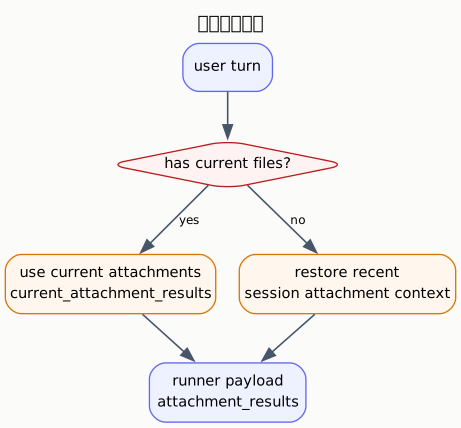
Use current_attachment_results when the user just uploaded a file. Use
attachment_results when follow-up questions should keep working with the prior
file.
Resume After Refresh
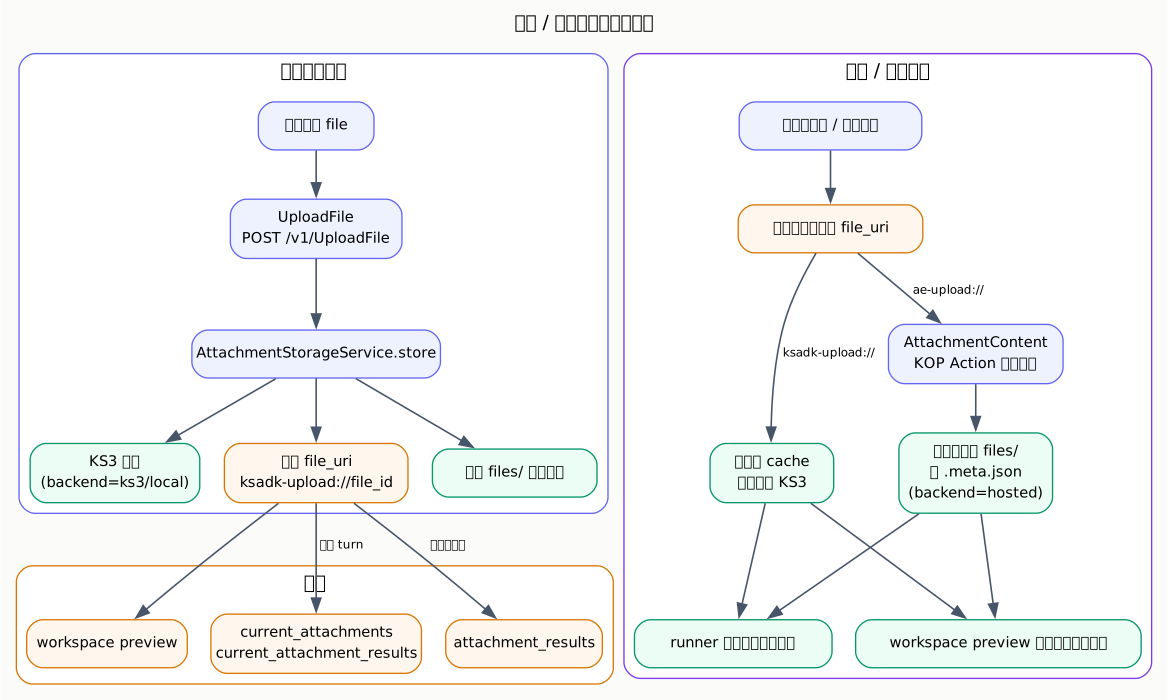
As long as the file_uri is still resolvable (local cache or a reachable
ae-upload:// backend), the runner and workspace preview keep reading real file
content after a refresh or session resume. Application code needs no special
handling.
Default Multimodal Model
New in 0.6.6+
Hosted deployments inject a shared model policy through
AGENTENGINE_MODEL_POLICY_JSON. Policy v1 defaults to glm-5.2 as the
primary model, kimi-k2.7-code as the multimodal model, and deepseek-v4-pro
as the fallback. Multimodal capability (vision / image) is routed to
kimi-k2.7-code by default.
| Setting | Purpose |
|---|---|
AGENTENGINE_MODEL_POLICY_JSON | platform-injected shared policy declaring primary / multimodal / fallback |
OPENCLAW_IMAGE_MODEL | explicit OpenClaw multimodal / image model override, takes precedence over the policy default |
HERMES_DEFAULT_MODEL / OPENCLAW_FALLBACK_MODEL | explicit environment-variable overrides still take precedence over policy defaults |
Precedence: explicit request-level model options > explicit environment variables > policy defaults.
To switch the image / vision model, set it explicitly in request model_options, or set OPENCLAW_IMAGE_MODEL to override the default multimodal model.
Safety Rules
- Validate file type and size before business processing.
- Treat uploaded file content as untrusted user input.
- Do not publish uploaded customer files, OCR text, or local file paths.
- Prefer placeholder data in docs and tests.
- Keep large binary fixtures out of the public repository unless reviewed.
- Prefer
file_dataorksadk-upload://references for local processing; do not assume the runtime will fetch arbitrary remotefile_urlvalues. - Avoid logging extracted attachment text in CI or public issue templates.