Frameworks
KsADK supports common Python agent framework families through runtime adapters
and also supports a declarative managed Runtime. Code frameworks expose an agent
object, declare the framework, and run through agentengine; Codex is declared
by an explicit YAML manifest and does not import a user Python agent.
Supported Families
| Framework | Install extra | Typical export |
|---|---|---|
| Google ADK | ksadk[adk] | root_agent = Agent(...) |
| LangGraph | ksadk[langgraph] | root_agent = graph.compile() |
| LangChain | ksadk[langchain] or framework dependencies | `root_agent = prompt |
| DeepAgents | ksadk[deepagents] | root_agent = create_deep_agent(...) |
| Codex ManagedRuntime (new in 0.8) | ksadk[codex] | YAML model / prompt; no agent.py |
Codex ManagedRuntime
Codex is the declarative “YAML is the agent” path. Its model and prompt in
agentengine.yaml define the agent, while runtime.name/version define the
shared local/cloud Runtime version boundary. It starts the official native Codex
subprocess locally and the Runtime catalog selects a Linux image in the cloud; it
does not use CodeBuilder or copy a developer-machine binary.
framework: codex
artifact_type: ManagedRuntime
runtime:
  name: codex
  version: "0.144.4"
model: gpt-5.1-codex
prompt: |
  You are a coding assistant.
Start with the YAML Is the Agent: Codex best practice.
Do not add entry_point, agent_variable, or a placeholder agent.py to this project.
Framework Runtime Architecture
KsADK treats every framework adapter as a small boundary around the user's native agent object. The local server, Web UI, session store, and OpenAI-compatible endpoints do not call framework-specific APIs directly. They call the runner contract, and the runner owns the framework details.
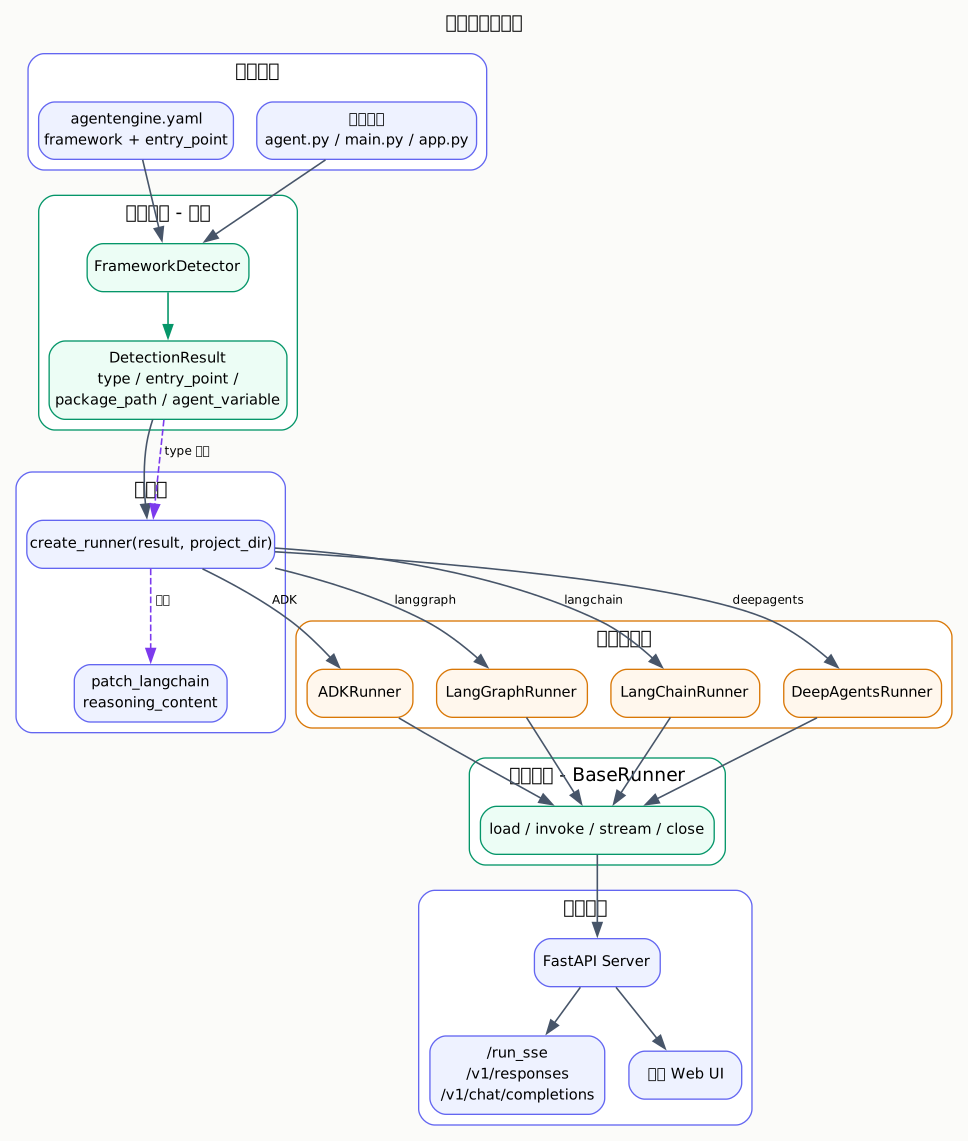
The important design point is that framework detection is static while runner loading is executable. Detection reads config files and source text; loading imports the configured module and validates the exported object. That keeps diagnostics clear: a project that cannot be detected has a packaging/config problem, while a project that detects correctly but fails to load has an import, dependency, or exported-object problem.
| Layer | Stable responsibility | Typical failure to check |
|---|---|---|
| detection | find framework, entry point, package path, and exported variable | missing or inconsistent agentengine.yaml |
| factory | map DetectionResult.type to a concrete runner | unsupported framework value |
| runner loading | import the module and validate the exported agent object | dependency import error or wrong agent_variable |
| conversation runtime | normalize input, history, attachments, and platform context | malformed payload or session conflict |
| protocol surface | serialize the result as Web UI, SSE, Responses, or Chat Completions | API format mismatch |
Google ADK
KsADK keeps the ADK programming model intact. The application still exports a
Google ADK Agent; KsADK detects the project, imports the configured object,
wraps it in the local runner, and exposes the same local CLI, Web UI, and HTTP
protocols used by other framework families.
from google.adk.agents import Agent

def hello(name: str) -> dict:
    return {"message": f"Hello, {name}!"}

root_agent = Agent(
    name="hello_agent",
    description="Minimal ADK example",
    instruction="You are a helpful assistant.",
    tools=[hello],
)
Project config:
name: hello-agent
framework: adk
entry_point: agent.py
agent_variable: root_agent
Recommended setup:
python -m venv .venv
source .venv/bin/activate
pip install -U "ksadk[adk]"
agentengine run . -i
agentengine web . --no-open
For ADK projects, optional KsADK integrations such as knowledge search, long-term memory tools, MCP toolsets, and Skill Runtime tools are injected during ADK runner loading when their environment variables are configured. A minimal ADK tutorial should leave those variables unset so the first run only depends on the ADK agent object and model configuration.
Common ADK loading failures:
| Error pattern | Check |
|---|---|
project detected as unknown | agentengine.yaml exists and sets framework: adk |
| configured object is missing | agent_variable matches the exported Python variable |
| model calls fail | provider env vars are visible inside the project virtualenv |
| optional tools are missing | the matching KsADK feature flags and dependencies are installed |
LangGraph
Managed checkpoint boundary
root_agent = graph.compile() is suitable for local runs. When managed PostgreSQL checkpointing is enabled, the entry module must also export callable ksadk_graph_factory(checkpointer=...) and ksadk_prepare_state(payload, session_context) hooks. Missing the factory or prepare hook returns LANGGRAPH_FACTORY_REQUIRED or PREPARE_STATE_HOOK_REQUIRED, respectively, instead of silently falling back to an in-memory checkpoint. See Agent Context for the full contract.
from langgraph.graph import END, StateGraph

class State(TypedDict):
    messages: Annotated[list, operator.add]

llm = ChatOpenAI(model="my-model", base_url="https://api.example.com/v1", api_key="sk-test")

def chat(state: State):
    return {"messages": [llm.invoke(state["messages"])]}

graph = StateGraph(State)
graph.add_node("chat", chat)
graph.set_entry_point("chat")
graph.add_edge("chat", END)

root_agent = graph.compile()
Project config:
name: langgraph-agent
framework: langgraph
entry_point: agent.py
agent_variable: root_agent
LangChain
from langchain_core.output_parsers import StrOutputParser
from langchain_core.prompts import ChatPromptTemplate
from langchain_openai import ChatOpenAI

llm = ChatOpenAI(model="my-model", base_url="https://api.example.com/v1", api_key="sk-test")
prompt = ChatPromptTemplate.from_messages([
    ("system", "You are a helpful assistant."),
    ("human", "{input}"),
])

root_agent = prompt | llm | StrOutputParser()
Project config:
name: langchain-agent
framework: langchain
entry_point: agent.py
agent_variable: root_agent
DeepAgents
llm = ChatOpenAI(model="my-model", base_url="https://api.example.com/v1", api_key="sk-test")
root_agent = create_deep_agent(model=llm)
Project config:
name: deep-agent
framework: deepagents
entry_point: agent.py
agent_variable: root_agent
Detection Order
KsADK first checks explicit project configuration. If no config file exists, it tries common project shapes:
- a package with
agent.py,main.py, orapp.py - a package
__init__.pythat exports common agent variables - a script-style project with
agent.py,main.py, orapp.py
Explicit YAML is recommended for public examples because it is easier to review and less dependent on heuristics.
Detection Details
Detection is a static step. It reads configuration files and source text, but it does not execute the user agent module. That keeps framework detection separate from framework loading.
The detection result carries these values into the runner factory:
| Field | Why it matters |
|---|---|
type | selects the runner adapter |
name | used for display and runtime metadata |
entry_point | Python file to import during runner loading |
package_path | package or directory that contains the entry point |
agent_variable | exported object to load from the entry point |
confidence | diagnostic signal for convention-based detection |
If a configured entry file exists but does not export the configured variable,
fix the export or the agent_variable setting. Do not work around this by
adding import side effects that create global state indirectly.
Detection To Runner Pipeline
Explicit configuration is the recommended path for public examples, but the detector also supports convention-based projects. The pipeline below is useful when reviewing examples or debugging why a project was loaded as the wrong framework.
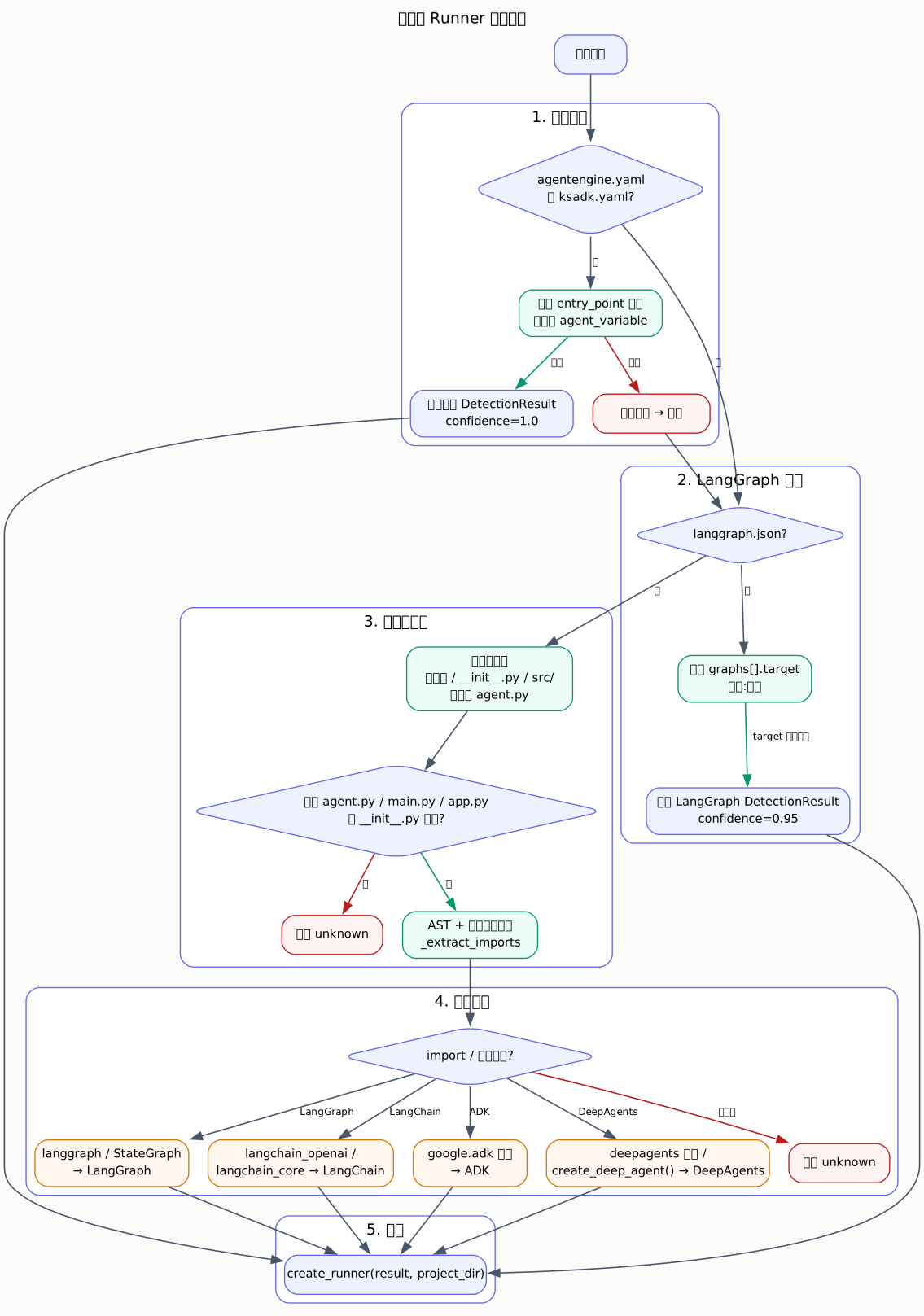
The runner factory applies a small LangChain compatibility patch, then creates one of the concrete runners. This is intentionally a narrow switch instead of a plugin registry: the public contract is easier to audit, and new framework families can be reviewed as explicit additions.
Runner Loading Behavior
Each runner keeps the framework's native execution model:
| Runner | Loading path | Native execution |
|---|---|---|
| ADK | imports the configured ADK Agent and wraps it in a Google ADK runner | ADK Runner.run_async() |
| LangGraph | imports the configured graph object | graph invoke / ainvoke / event stream |
| LangChain | imports the configured runnable, chain, or callable | runnable/callable invoke and stream |
| DeepAgents | reuses the LangGraph runner path | compiled graph execution |
| Codex | reads a declarative manifest without importing a user Agent object | official Codex app-server subprocess |
The adapters normalize the result into {"output": ...} for non-streaming calls
and semantic chunks for streaming calls. They do not rewrite the user's agent
into a different framework.
Runner Responsibilities
All framework adapters implement the same public responsibilities:
| Responsibility | Meaning |
|---|---|
| load | import the configured module and validate the exported object |
| prepare | apply per-request model overrides where supported |
| invoke | run one non-streaming turn |
| stream | run one streaming turn |
| close | release framework or runtime resources on shutdown |
This keeps the HTTP server and Web UI independent from framework-specific objects. Framework-specific behavior belongs in the adapter or in the application's own hook functions.
Custom Input Hooks
LangGraph and LangChain applications often use custom state shapes. Add a hook in the configured entry module when the default mapping is not enough:
def ksadk_prepare_state(payload: dict, session_context: dict) -> dict:
    return {
        "messages": payload.get("input_messages", []),
        "question": payload.get("input", ""),
        "knowledge": session_context.get("kb_context"),
        "memory": session_context.get("memory_context"),
}def ksadk_prepare_input(payload: dict, session_context: dict) -> dict:
return {
"question": payload.get("input", ""),
"history": session_context.get("history", []),
"attachments": payload.get("attachment_results", []),
}Hooks make examples easier to test because business code receives a stable, explicit dictionary instead of reading local UI events or session internals.
Model Overrides
Requests can provide a model override through the CLI or HTTP payload. KsADK normalizes the requested model and calls the runner before execution. The effect depends on the framework:
| Framework family | Typical behavior |
|---|---|
| ADK | applies the requested model to the loaded agent tree when possible |
| LangGraph | synchronizes model environment variables and reloads the module when needed |
| LangChain | synchronizes model environment variables and reloads the module when needed |
| Remote runner | forwards the model in the outgoing OpenAI-compatible payload |
For deterministic examples, set a default model in .env or your provider
configuration, then use request-level overrides only when you need to test model
selection.
Session Continuity
Frameworks differ in how much native session state they expose. KsADK describes that capability through runner session adapters:
| Continuity path | Meaning |
|---|---|
| transcript replay | KsADK projects prior session events back into model history |
| standard hook | user hook receives structured history and session context |
| framework checkpoint | framework runtime keeps recoverable state |
| native session | framework has its own session service or equivalent state |
Transcript replay is the portable baseline. Native checkpoint or session paths are useful when the framework supports them, but examples should still behave reasonably when only transcript replay is available.
New in 0.6.7
KsADK distinguishes two resume semantics through
GetAgentUiBootstrap.RuntimeCapabilities.ResumeRun.ResumeMode. LangGraph
declares time_travel, which can roll back to a historical checkpoint. ADK
declares forward_only, which continues only along the framework's native
event/invocation continuity. The default runner is none. The list,
preview, and resume entry points are provided by the three actions
ListSessionCheckpoints, GetCheckpointResumePreview, and ResumeRun;
whether they are enabled follows the bootstrap capability.
| Framework family | ResumeMode | Meaning |
|---|---|---|
| LangGraph | time_travel | can roll back to a historical checkpoint |
| ADK | forward_only | continues only along native event/invocation continuity |
| default runner | none | no resume capability declared; entry points stay disabled |
Local Invocation
All framework examples should support the same local commands:
agentengine run . -i
agentengine web . --no-open
Hosted deployment examples are optional and must provide a local fallback.