Tools And Skill Runtime
KsADK can expose tools to an agent through framework-native tools, MCP/A2A integrations, and the optional Skill Runtime. The public rule is simple: tools should be declared explicitly, validated at runtime, and isolated from secrets or local files the agent does not need.
Tool Layers
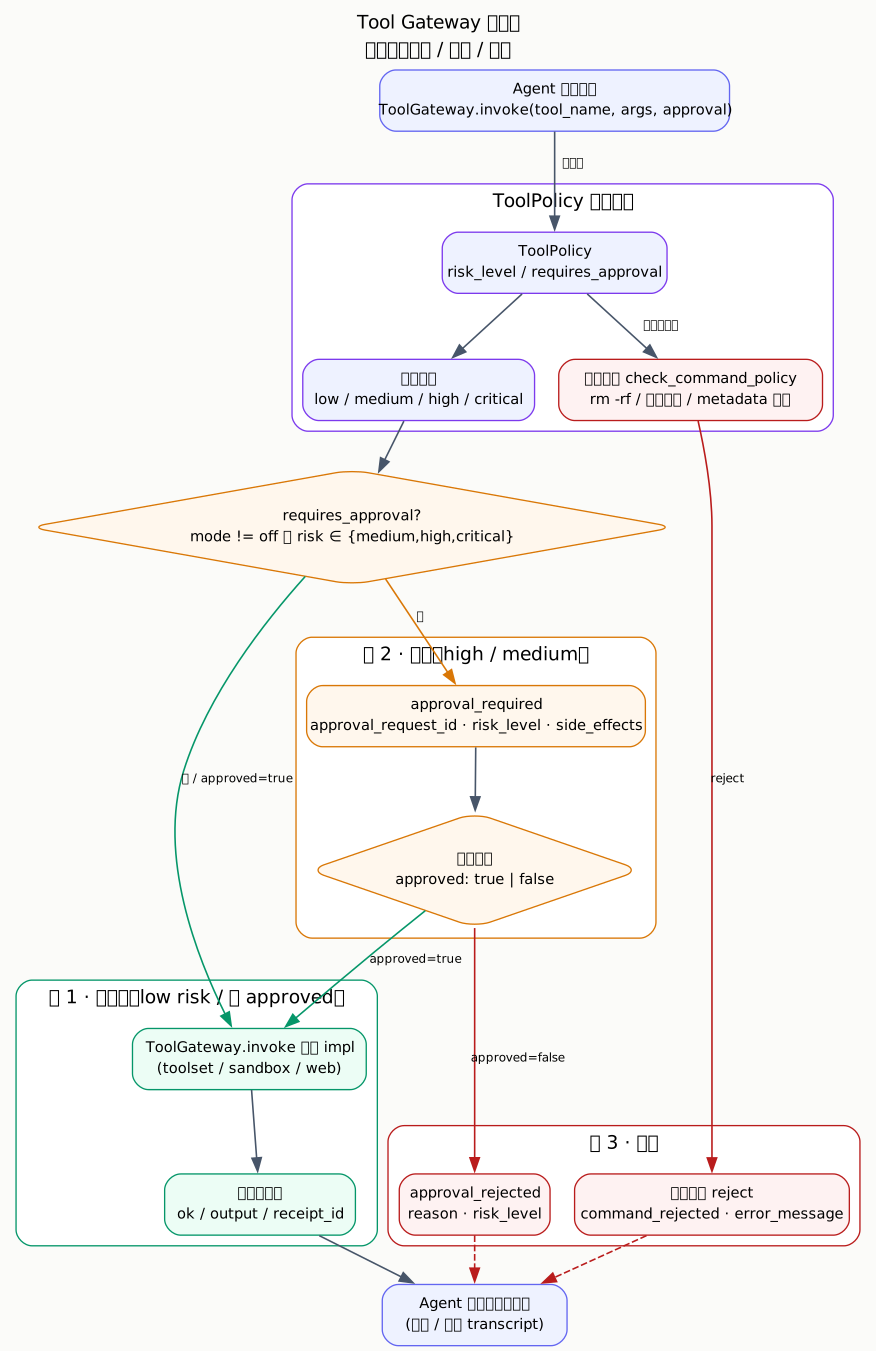
The framework adapter normalizes tool definitions before an agent run. The agent
receives a stable tool description, a narrow input schema, and a structured
result that can be rendered in the local Web UI or projected back into session
history. Before the real implementation is called, ToolGateway.invoke()
checks the ToolPolicy: in strict mode, medium / high / critical risk tools
return approval_required and only proceed down the execute branch after a
human confirms.
When To Use Each Tool Path
| Need | Recommended path |
|---|---|
| Simple Python helper inside the agent project | framework-native function tool |
| External tool server with its own lifecycle | MCP toolset |
| Agent-to-agent protocol integration | A2A client or adapter |
| Reusable executable skill with optional sandboxing | Skill Runtime |
| Local development only | local backend with explicit paths and test data |
| Untrusted or expensive execution | reviewed sandbox backend and limits |
| Common AgentEngine built-ins | the ksadk.toolsets focused profile |
| Infrequent or higher-risk built-ins | agentengine_tool_dispatcher list/describe/call |
Use the simplest path that gives the agent enough capability. Do not route a plain deterministic helper through a remote runtime just to make it look like a tool.
AgentEngine Built-In Tools
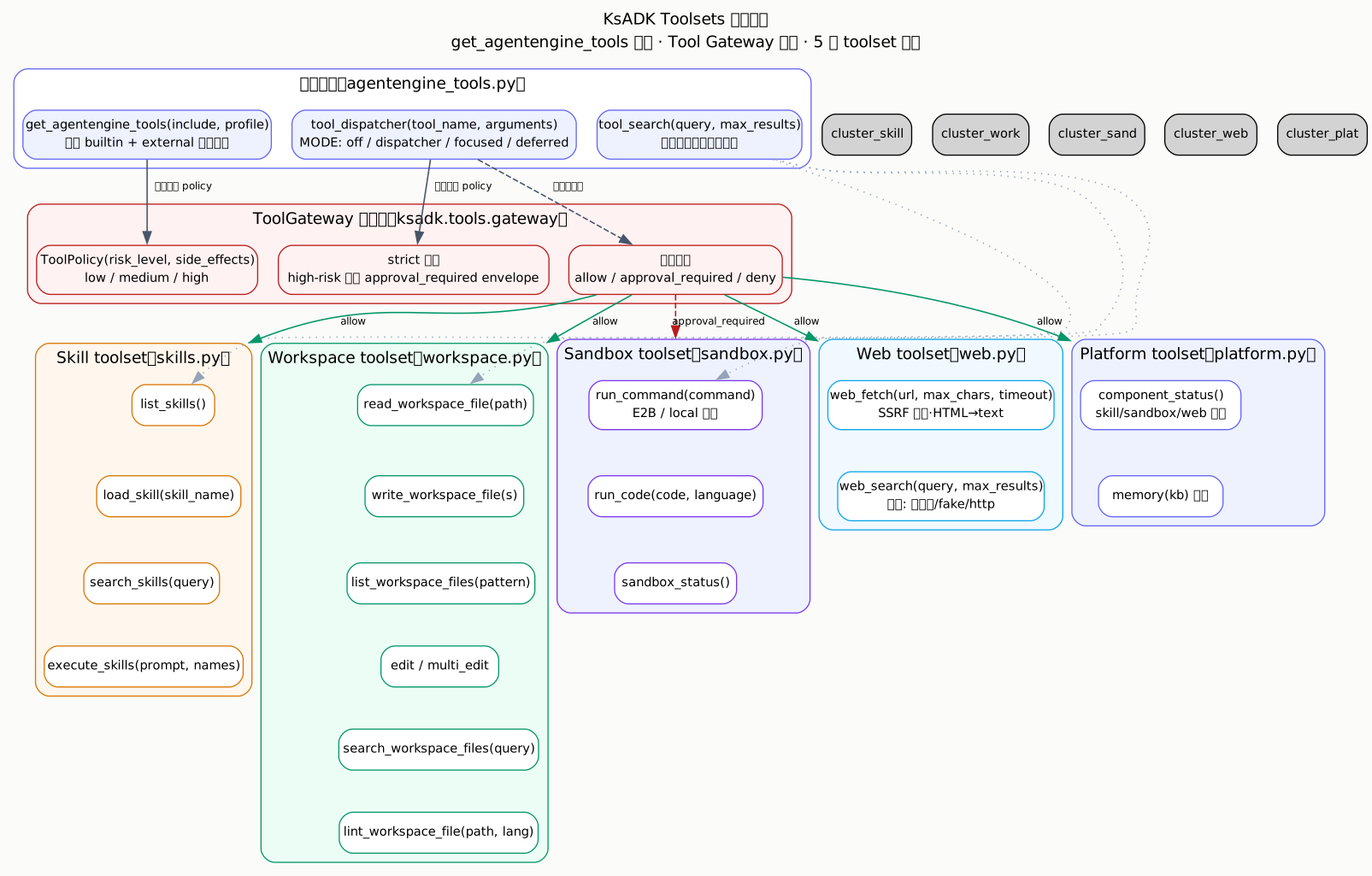
ksadk.toolsets provides SDK built-in tool entry points. Calling
get_agentengine_tools() with no arguments still returns the full built-in
tool list for compatibility. New projects should choose an explicit set:
from ksadk.toolsets import describe_agentengine_tools, get_agentengine_tools

tools = get_agentengine_tools(include=["focused", "agentengine_tool_dispatcher"])
tool_descriptions = describe_agentengine_tools(include=["focused", "agentengine_tool_dispatcher"])
include can mix groups, profiles, and concrete tool names:
| include | Meaning |
|---|---|
skill / workspace / platform / sandbox | bind a built-in tool group |
focused / core | bind the common low-risk tool set |
concrete names such as run_code | explicitly add one tool |
focused/core directly exposes:
list_skills,search_skills,load_skillworkspace_status,search_workspace_filesedit_workspace_file,lint_workspace_filecomponent_status,sandbox_status
execute_skills, run_command, run_code, delete_workspace_file, and
whole-file write tools are not part of the focused profile by default.
Bind these tools explicitly, or call them through the dispatcher when needed.
Dispatcher And Progressive Disclosure
tool_dispatcher(action, tool_name=None, arguments=None, include=None, profile="default")
is the low-risk index tool in ksadk/toolsets/__init__.py. It lets the model
list, describe, and call KsADK local built-in tools by name only when needed,
keeping the model context smaller. It invokes the real tool object, so it still
goes through Tool Gateway approval policy.
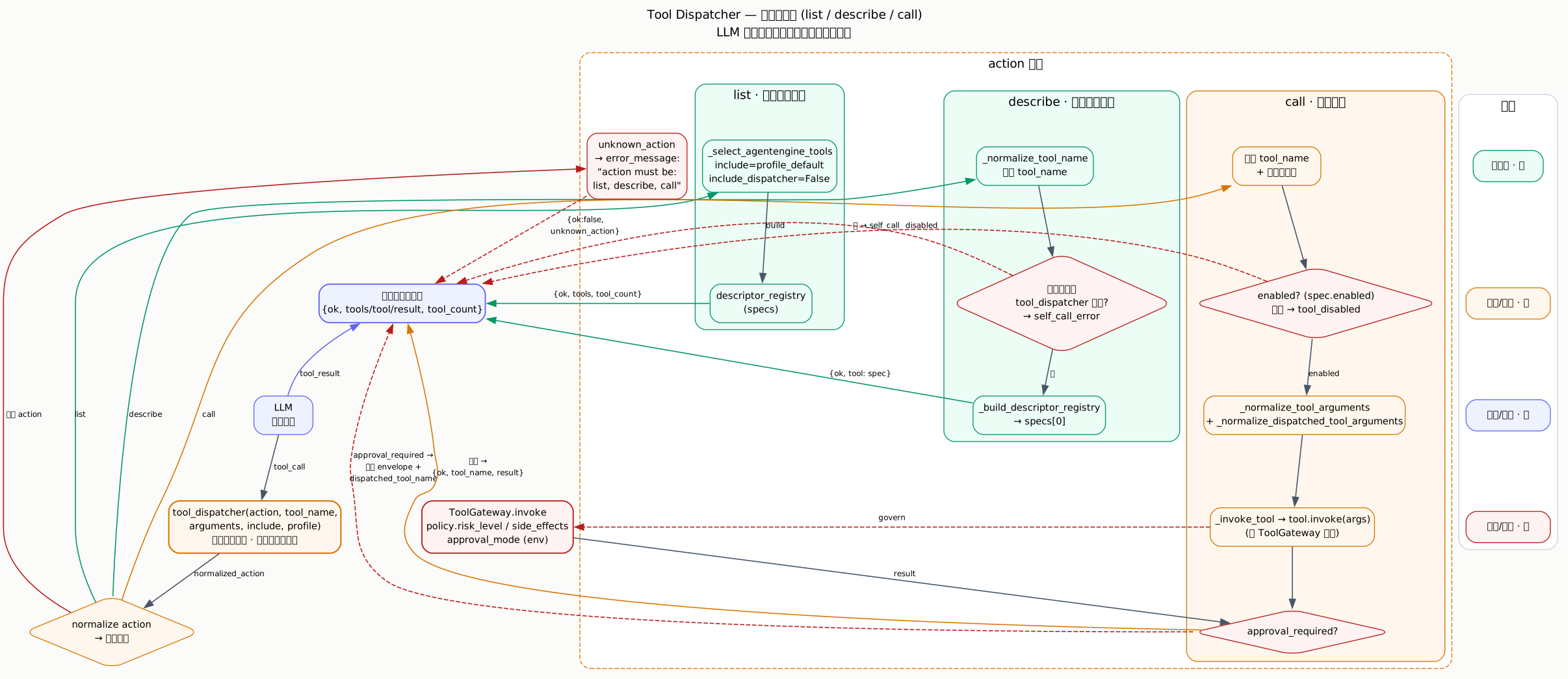
| action | Behavior |
|---|---|
list | list dispatchable tools, excluding the dispatcher itself; returns tools + tool_count |
describe | return one tool description, risk_level, requires_approval, and boundary |
call | call a KsADK local built-in tool by name; returns ok + tool_name + result |
The three actions share the same built-in tool registry and all exclude
tool_dispatcher / agentengine_tool_dispatcher itself to avoid recursion. The
call branch ultimately goes through ToolGateway.invoke, so in strict mode
run_command, run_code, execute_skills, and workspace write/delete tools
still return an approval_required envelope that the caller (UI or outer
runtime) must pass back with the approval result.
The dispatcher only schedules KsADK local built-in tools. It does not connect to a console Tool Space database or perform remote dynamic tool binding. It calls the real tool object, so it does not bypass Tool Gateway approval policies. For example, in strict mode run_command, run_code, execute_skills, and workspace write/delete calls still return an approval_required envelope.
Platform Tool Reference
component_status is the only low-risk read-only tool in the platform group. It
lets an agent inspect, at runtime, whether AgentEngine has bound a model,
knowledge base, long-term memory, skill space, sandbox, and workspace. It reads
environment variables and bound state and has no side effects.
component_status
from ksadk.toolsets.platform import component_status

component_status() -> dict| Field | Value |
|---|---|
| Risk level | low |
| Requires approval | No |
| Side effects | None (read-only) |
| Group | platform |
| Entry | get_agentengine_tools(include=["platform"]) |
Return shape
{
  "ok": True,
  "summary": {
    "model": "glm-5.1",
    "knowledge_base_bound": True,
    "long_term_memory_bound": False,
    "skill_space_bound": True,
    "isolated_execution": "enabled",
    "sandbox_direct_tools": "enabled",
  },
  "skill_space": {"space_ids": [...], "tools": [...]},
  "skill_runtime": {"backend": "e2b", "enabled": True, "template_bound": True},
  "sandbox": {"backend": "e2b", "enabled": True, "tools": ["sandbox_status", "run_command", "run_code"]},
  "workspace": {"root": "/.../workspace", "tools": [...]},
}
Related environment variables
| Variable | Purpose |
|---|---|
OPENAI_MODEL_NAME / MODEL_NAME | reflected in summary.model |
KSADK_KB_DATASET_ID | whether a knowledge base is bound |
KSADK_LTM_NAMESPACE | whether long-term memory is bound |
KSADK_SANDBOX_TEMPLATE_ID / KSADK_SKILL_RUNTIME_TEMPLATE_ID | sandbox template binding |
KSADK_SKILL_RUNTIME_BACKEND | Skill Runtime backend type |
Workspace Tool Reference
Workspace tools are confined to the AgentEngine UI workspace directory
(resolve_local_session_dir() / workspace). All paths are normalized and
out-of-bound access is rejected. Write operations are rated medium risk and
delete_workspace_file is rated high; both require approval in strict mode.
0.6.7 session-scoped read_state
read_workspace_file records a WorkspaceReadState (mtime, size, line range).
edit_workspace_file / multi_edit_workspace_file must validate that state
before writing: an unread file returns file_not_read and a file changed since
the last read returns file_modified_since_read. The state is keyed by
session_id — workspace_state.py uses (session_id, path) as the key and
defaults to the current session from ToolExecutionContext, so read_state does
not leak across sessions or accounts.
workspace_status
workspace_status() -> dict| Field | Value |
|---|---|
| Risk level | low |
| Requires approval | No |
| Side effects | None (read-only; will mkdir the root) |
| Group | workspace / focused |
Returns the workspace root, a sample of up to 50 files, and file_count_sampled.
list_workspace_files
list_workspace_files(
    path: str = ".",
    glob: str | None = None,
    recursive: bool = False,
    include_dirs: bool = True,
    max_results: int = 500,
    sort_by: str = "name",  # name | mtime | size
) -> dict| Field | Value |
|---|---|
| Risk level | low |
| Requires approval | No |
| Side effects | None (read-only) |
| Group | workspace / focused |
Returns entries (name / path / type / size / mtime_ns) and a
truncated flag. max_results is capped at 5000; a missing path returns
ok=False + error_message.
read_workspace_file
read_workspace_file(
    path: str,
    start_line: int | None = None,
    end_line: int | None = None,
    max_chars: int | None = None,
    include_line_numbers: bool = True,
) -> dict| Field | Value |
|---|---|
| Risk level | low |
| Requires approval | No |
| Side effects | None (read-only, but writes read_state) |
| Group | workspace / focused |
Reads UTF-8 text (rejects files >2MB). Supports line ranges, line numbers, and a
character budget (1000–100000). Returns content / read_range /
total_lines / partial; output beyond the budget is persisted as a preview.
Also records WorkspaceReadState for subsequent edit validation.
write_workspace_file
write_workspace_file(
    path: str,
    content: str,
    overwrite: bool = True,
    approval: dict | None = None,
) -> dict| Field | Value |
|---|---|
| Risk level | medium |
| Requires approval | Yes in strict mode |
| Side effects | workspace_write |
| Group | workspace (not in focused by default) |
Whole-file write. With overwrite=False, an existing file returns ok=False.
In strict mode, calling without approval returns an approval_required
envelope.
write_workspace_files
write_workspace_files(
    files: list[dict],  # [{path, content}, ...]
    overwrite: bool = True,
    approval: dict | None = None,
) -> dict| Field | Value |
|---|---|
| Risk level | medium |
| Requires approval | Yes in strict mode |
| Side effects | workspace_write |
| Group | workspace (not in focused by default) |
Batch whole-file write. Up to 100 files per call. Returns written and
truncated.
edit_workspace_file
edit_workspace_file(
    path: str,
    old_text: str,
    new_text: str,
    expected_replacements: int = 1,
    replace_all: bool = False,
    approval: dict | None = None,
) -> dict| Field | Value |
|---|---|
| Risk level | medium |
| Requires approval | Yes in strict mode |
| Side effects | workspace_edit |
| Group | workspace / focused |
Exact snippet replacement. Requires a prior read_workspace_file, otherwise
returns file_not_read. A missing old_text returns snippet_not_found (with
nearby_candidates), and a match count that disagrees with
expected_replacements returns ambiguous_edit. Returns a unified diff
(persisted under budget). Supports quote-normalized matching (straight and
curly quotes are interchangeable).
multi_edit_workspace_file
multi_edit_workspace_file(
    path: str,
    edits: list[dict],  # [{old_text, new_text, expected_replacements?, replace_all?}, ...]
    replace_all: bool = False,
    approval: dict | None = None,
) -> dict| Field | Value |
|---|---|
| Risk level | medium |
| Requires approval | Yes in strict mode |
| Side effects | workspace_edit |
| Group | workspace |
Atomic multi-snippet edit. If any edit fails, nothing is written and
failed_edit_index is returned. On success returns edit_count /
replacements and per-edit diagnostics.
lint_workspace_file
lint_workspace_file(
    path: str,
    language: str = "auto",  # auto | python | json | markdown | text
) -> dict| Field | Value |
|---|---|
| Risk level | low |
| Requires approval | No |
| Side effects | None (read-only) |
| Group | workspace / focused |
Lightweight built-in checks: Python uses ast.parse, JSON uses json.loads,
others scan for NUL bytes and trailing whitespace. ok is true only when no
error-level issue is found. lint_model is fixed to built_in_lightweight —
this is not a project formatter or a full lint pipeline.
search_workspace_files
search_workspace_files(
    query: str,
    path: str = ".",
    is_regex: bool = False,
    glob: str | None = None,
    case_sensitive: bool = False,
    context_lines: int = 0,
    max_results: int = 100,
) -> dict| Field | Value |
|---|---|
| Risk level | low |
| Requires approval | No |
| Side effects | None (read-only) |
| Group | workspace / focused |
Uses rg (ripgrep) when available for speed, otherwise falls back to pure
Python. Returns results (path / line / text / context_before /
context_after), match_count, truncated, and search_backend (rg or
python). Files >1MB are skipped; context_lines is capped at 20;
max_results is capped at 5000.
delete_workspace_file
delete_workspace_file(
    path: str,
    approval: dict | None = None,
) -> dict| Field | Value |
|---|---|
| Risk level | high |
| Requires approval | Yes in strict mode |
| Side effects | workspace_delete |
| Group | workspace (not in focused by default) |
Deletes a file or empty directory. Refuses to delete the workspace root. Non-empty directories must be cleared first.
Multi-Framework Integration Examples
from langgraph.prebuilt import create_react_agent
from ksadk.toolsets import get_agentengine_tools

# focused includes workspace read/search/edit/lint + component_status by default
tools = get_agentengine_tools(include=["focused"])

# explicitly add the high-risk delete capability (approval required in strict mode)
tools += get_agentengine_tools(include=["delete_workspace_file"])

agent = create_react_agent(model="openai/glm-5.1", tools=tools)from langchain.agents import create_tool_calling_agent
from ksadk.toolsets import get_agentengine_tools
# as_tool() already wraps workspace functions as LangChain Tools
tools = get_agentengine_tools(include=["workspace"])
# a single tool can also be imported directly
from ksadk.toolsets.workspace import edit_workspace_file
tools.append(edit_workspace_file)from google.adk.agents import LlmAgent
from ksadk.toolsets import get_agentengine_tools
# an ADK Agent accepts a tool list directly
agent = LlmAgent(
name="workspace_agent",
model="openai/glm-5.1",
instruction="Use workspace tools to read and edit files.",
tools=get_agentengine_tools(include=["focused"]),
)Write operations require approval
In strict mode, write_workspace_file / write_workspace_files /
edit_workspace_file / multi_edit_workspace_file (medium) and
delete_workspace_file (high) return an approval_required envelope first.
The caller (local Web UI or outer runtime) must pass the user's confirmation
back through the approval parameter before the real execution branch runs.
Tool Gateway And Human Approval
Tool Gateway owns tool risk, approval, and execution boundaries. It does not perform context compression. Enable strict approval with:
Strict mode approval
In strict mode, medium / high / critical risk tools return a structured approval_required result before execution. A UI or outer runtime can show the approval request, then pass the approval result back into the tool call after the user confirms.
| Tool type | Default risk | Behavior |
|---|---|---|
| workspace read/search/status | low | execute directly |
edit_workspace_file / write file | medium | approval required in strict mode |
delete_workspace_file | high | approval required in strict mode |
execute_skills | high | approval required in strict mode |
run_command / run_code | high | approval required in strict mode, sandbox backend only |
edit_workspace_file performs exact snippet replacement. It returns snippet_not_found when old_text is absent, and ambiguous_edit when the match count does not equal expected_replacements. lint_workspace_file is a lightweight built-in check for Python AST parsing, JSON parsing, and generic text issues; it is not a project formatter or a full lint pipeline.
Skill Loading Sequence
load_skills() in ksadk/skills/runtime/loader.py merges local skills with
remote skill manifests at agent load time. Remote skills are first listed
through the Skill Service, then their download URL is fetched, the archive is
sha256-verified and safely extracted, and finally handed to
load_local_skill() to become a LocalSkill.
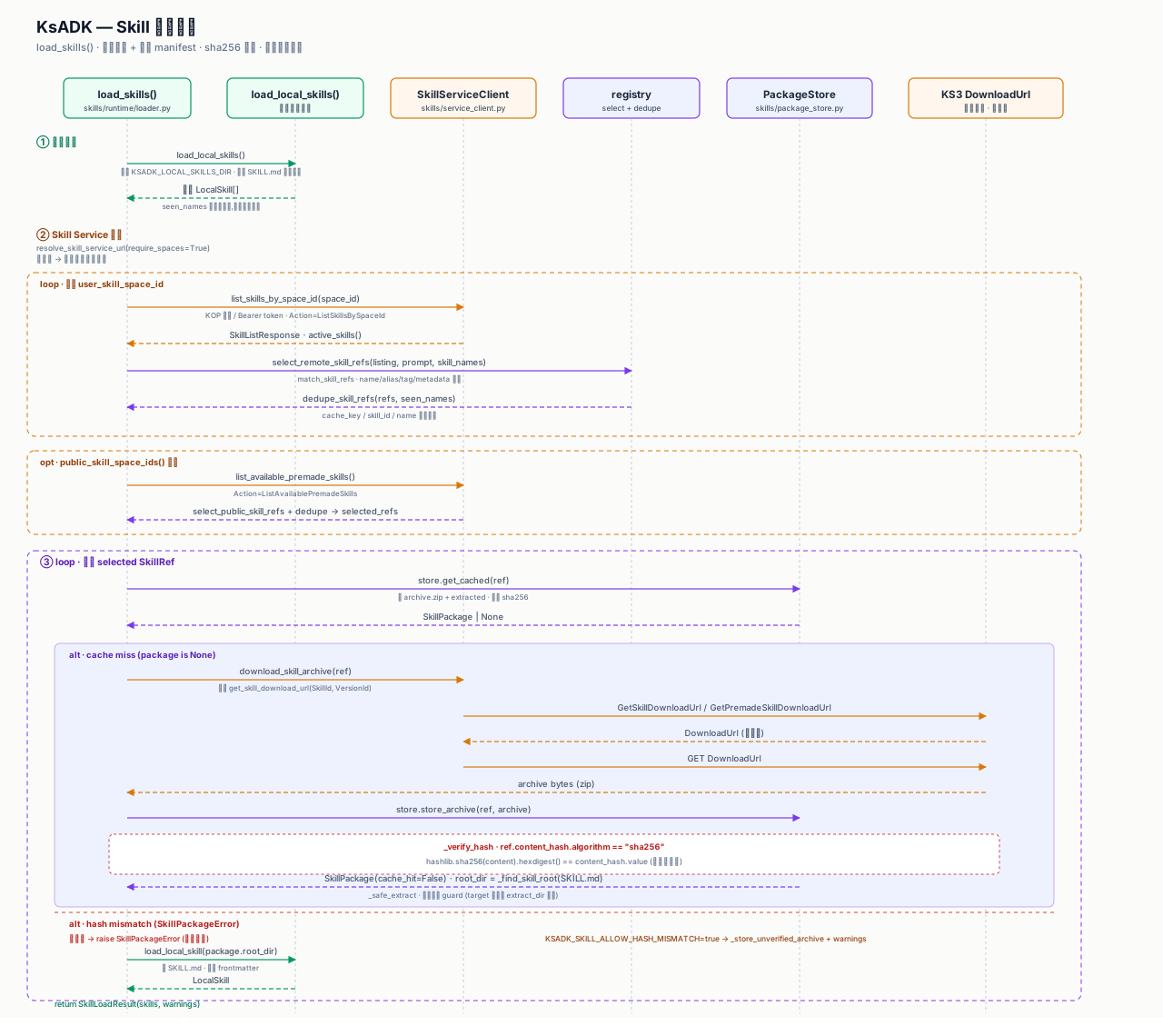
The mermaid sequence below is the text version of the same flow:
This sequence defines the Skill Runtime security boundary: a remote zip must
pass both the sha256 check and a path-traversal guard before it is extracted,
and a skill only becomes a LocalSkill once SKILL.md is located.
KSADK_SKILL_ALLOW_HASH_MISMATCH skips hash failures only when explicitly set,
and even then the warning is written back to SkillLoadResult.warnings.
This also explains the boundary: Skill Runtime and MCP are ADK agent load-time extensions; A2A is an outer runner protocol adapter. A runner exposed through A2A can still use the injected tools, but the A2A Server itself does not parse MCP and does not run the sandbox.
Skill Tool Reference
ksadk.toolsets.skills exposes four Skill tools. The first three (list_skills,
search_skills, load_skill) are low risk and read Skill Spaces directly;
execute_skills is high risk and runs through the isolated Skill Runtime.
list_skills
List remote skill manifests discoverable for the current account (user Skill Spaces plus public premade spaces, deduplicated).
list_skills() -> dict[str, Any]| Field | Value |
|---|---|
| Risk level | low |
| Approval required | No |
| Side effects | None |
| Group | skill / focused |
| env var | KSADK_SKILL_SPACE_IDS / KSADK_PUBLIC_SKILL_SPACE_IDS / KSADK_SKILL_SERVICE_URL |
Returns ok, skills (manifest list with name/description/version/space_id),
and skill_space_ids. Returns ok=False with an error structure when the
Skill Service is not configured.
from ksadk.toolsets.skills import list_skills

result = list_skills()
# {"ok": True, "skills": [...], "skill_space_ids": ["space_xxx"]}
search_skills
Fuzzy-match skills by name, aliases, tags, description, and examples.
search_skills(query: str, max_results: int = 10) -> dict[str, Any]| Field | Value |
|---|---|
| Risk level | low |
| Approval required | No |
| Side effects | None |
| Group | skill / focused |
| env var | same as list_skills |
Returns ok, query, and results (each with name/score/description). An
empty query returns ok=False.
from ksadk.toolsets.skills import search_skills

hits = search_skills("diagram", max_results=5)
# {"ok": True, "query": "diagram", "results": [...]}
load_skill
Download and load a skill's SKILL.md instructions into the outer agent
context (does not run the isolated runtime).
load_skill(skill_name: str) -> dict[str, Any]| Field | Value |
|---|---|
| Risk level | low |
| Approval required | No |
| Side effects | skill_cache_write (writes to the local cache dir) |
| Group | skill / focused |
| env var | KSADK_SKILL_SERVICE_URL / KSADK_SKILL_CACHE_DIR |
Returns ok, instructions, name, version, root_dir, has_scripts_dir,
script_files, cache_hit, and usage. Returns ok=False with
available_skills when the skill is not found.
The usage field tells the model to complete the task in the outer agent unless the skill explicitly requires isolated execution. Use execute_skills for isolated execution.
from ksadk.toolsets.skills import load_skill

skill = load_skill("baoyu-diagram")
# skill["instructions"] is the SKILL.md body, ready to feed into agent context
execute_skills
Hand a workflow prompt to the Skill Runtime for isolated execution, optionally pre-binding skill names.
execute_skills(
    workflow_prompt: str,
    skill_names: list[str] | str | None = None,
    approval: dict[str, Any] | None = None,
) -> dict[str, Any]| Field | Value |
|---|---|
| Risk level | high |
| Approval required | Yes in strict mode |
| Side effects | isolated_runtime_execution |
| Group | skill (not in focused by default) |
| env var | KSADK_SKILL_RUNTIME_BACKEND / KSADK_SANDBOX_TEMPLATE_ID / KSADK_SKILL_RUNTIME_TIMEOUT |
Returns a runtime result (ok, exit_code, stdout, stderr,
duration_ms, timed_out, output_files, ...) plus
execution_context=f"skill-runtime/{backend}". Returns skill_runtime_disabled
with a hint when no runtime backend is configured.
execute_skills needs approval and an isolated runtime
execute_skills is high risk with the isolated_runtime_execution side effect. Under KSADK_TOOL_APPROVAL_MODE=strict the call first returns an approval_required envelope; the UI or outer runtime must pass approval={"approved": True} back before execution. When no runtime is configured it returns a skill_runtime_disabled error suggesting KSADK_SKILL_RUNTIME_BACKEND=local_process|e2b or a sandbox template id.
execute_skills Orchestration
After ToolGateway.invoke approves the call, execute_skills enters
_execute_skills_impl and finally reaches the runtime tool built by
build_execute_skills_tool. The flow:
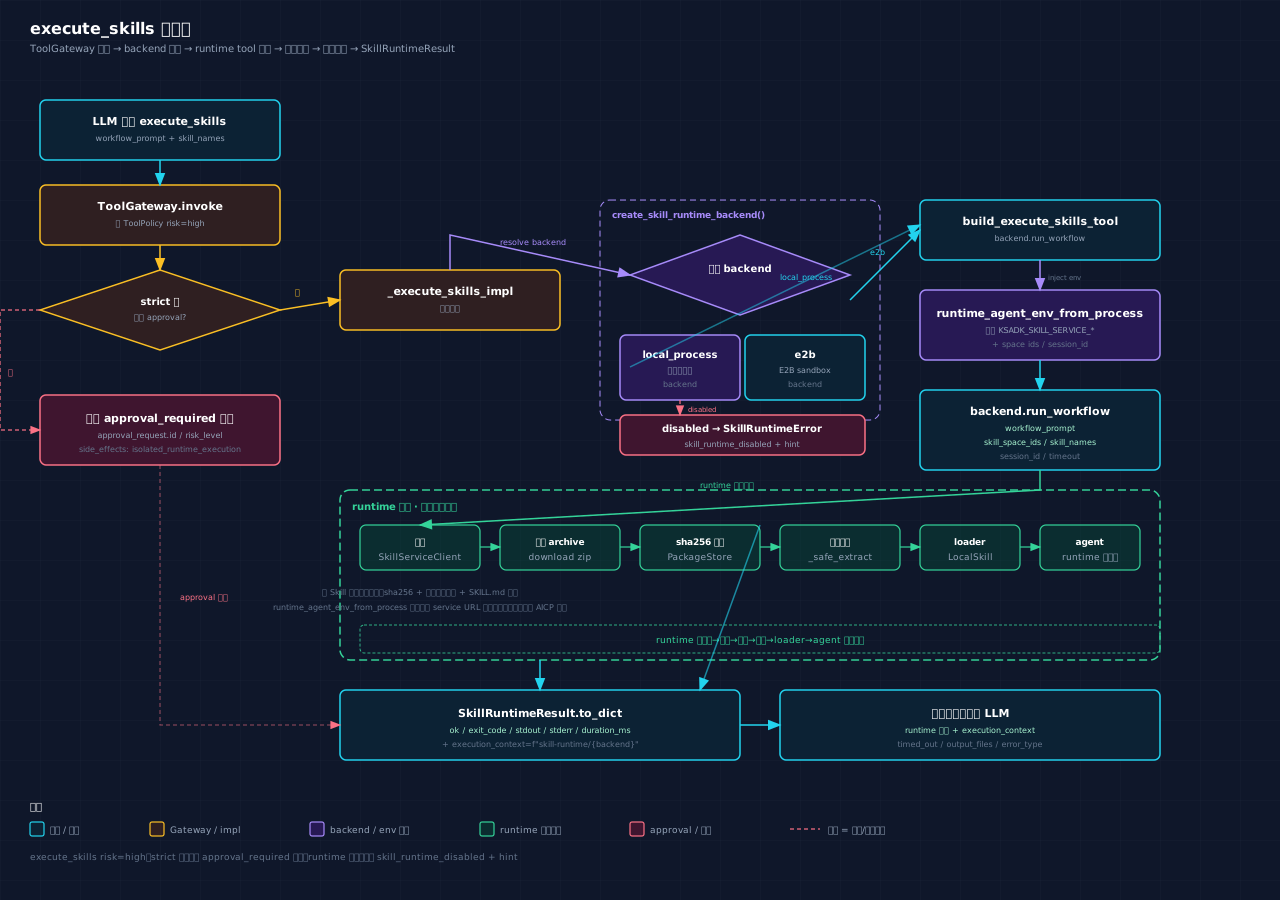
The runtime-internal "discover -> download -> sha256 -> extract -> loader -> agent" mirrors the Skill Loading Sequence above: SkillServiceClient lists skills, download_skill_archive fetches the zip, PackageStore.store_archive verifies sha256 and guards against path traversal, then load_local_skill loads it into the agent running inside the runtime subprocess.
Skill Tools Multi-Framework Integration
from ksadk.toolsets.skills import get_skill_tools

# as_tool auto-converts Python functions to framework tools
tools = get_skill_tools() # [list_skills, search_skills, load_skill, execute_skills]from google.adk.agents import LlmAgent
from ksadk.toolsets import get_agentengine_tools
# focused profile already includes list_skills / search_skills / load_skill
tools = get_agentengine_tools(include=["focused"])
root_agent = LlmAgent(name="skill_agent", model=model, tools=tools)from ksadk.toolsets import get_agentengine_tools
# focused does not include execute_skills by default; extend explicitly
tools = get_agentengine_tools(include=["focused", "execute_skills"])Dispatcher Tool Reference
tool_dispatcher and its compatibility alias agentengine_tool_dispatcher
are low-risk index tools that let the model list, describe, and call KsADK local
built-in tools by name, instead of loading every tool description into context.
tool_search is a read-only search tool that returns matched tool descriptions,
risk levels, and boundaries.
tool_dispatcher
tool_dispatcher(
    action: str,  # list | describe | call
    tool_name: str | None = None,
    arguments: dict[str, Any] | str | None = None,
    include: str | Iterable[str] | None = None,
    profile: str = "default",  # default | coding
) -> dict[str, Any]| Field | Value |
|---|---|
| Risk level | low (itself); call inherits the target tool policy |
| Approval required | Not for the dispatcher itself; call goes through ToolGateway.invoke |
| Boundary | local_ksadk_builtin_tools |
| Group | dispatcher |
| Param | Type | Notes |
|---|---|---|
action | str | list / describe / call |
tool_name | str | required for describe / call; cannot be the dispatcher itself |
arguments | dict / JSON string | passed to the target tool on call; JSON strings are json.loads-ed |
include | str / list[str] | restrict the list tool set |
profile | str | default (all groups) or coding (focused) |
Progressive Disclosure (list -> describe -> call)
All three actions share one registry and exclude tool_dispatcher /
agentengine_tool_dispatcher itself to avoid recursion. The call branch
ultimately goes through ToolGateway.invoke, so in strict mode run_command,
run_code, execute_skills, and workspace write/delete tools still return an
approval_required envelope.
| action | Behavior |
|---|---|
list | list dispatchable tools excluding the dispatcher; returns tools + tool_count |
describe | return one tool's risk_level / requires_approval / boundary |
call | call a tool by name; returns ok + tool_name + result; approval_required is forwarded with dispatched_tool_name |
from ksadk.toolsets import tool_dispatcher

# 1. list which tools are dispatchable
tools = tool_dispatcher(action="list", profile="coding")
# 2. describe run_command risk and boundary
spec = tool_dispatcher(action="describe", tool_name="run_command")
# 3. call for real (may return approval_required under strict)
out = tool_dispatcher(action="call", tool_name="run_command",
                     arguments={"command": "ls -la"})
tool_search
tool_search(
    query: str,
    profile: str = "coding",
    max_results: int = 8,
    include_disabled: bool = False,
) -> dict[str, Any]| Field | Value |
|---|---|
| Risk level | low |
| Approval required | No |
| Side effects | None (read-only) |
| Boundary | local_ksadk_builtin_tool_registry |
| Group | tools |
Returns ok, query, results (each with name/score/group/risk_level/
boundary/execution) and deferred_tool_names. tool_search searches both
built-in tool descriptions and framework-managed tools registered via
register_external_tools, but never executes any tool; it only returns
deferred_tool_names so the caller can later tool_dispatcher(action="call").
from ksadk.toolsets import tool_search

hits = tool_search("read file", profile="coding", max_results=5)
# {"ok": True, "results": [{"name": "read_workspace_file", "score": 4.0, ...}], ...}
Built-In Tool Mode And Profile
Two environment variables control how many built-in tools KsADK exposes to the runtime:
| Variable | Value | Behavior |
|---|---|---|
KSADK_BUILTIN_TOOLS_MODE | off | no built-in tools injected |
direct (default) | inject all tool objects per profile | |
focused | inject the focused tool set (includes tool_search) | |
dispatcher / deferred | inject only tool_dispatcher / tool_search, expand on demand |
| Variable | Value | Behavior |
|---|---|---|
KSADK_BUILTIN_TOOLS_PROFILE | default | all built-in groups (skill/workspace/platform/sandbox/web) |
coding | focused subset (workspace read/write, search, sandbox status, web, ...) |
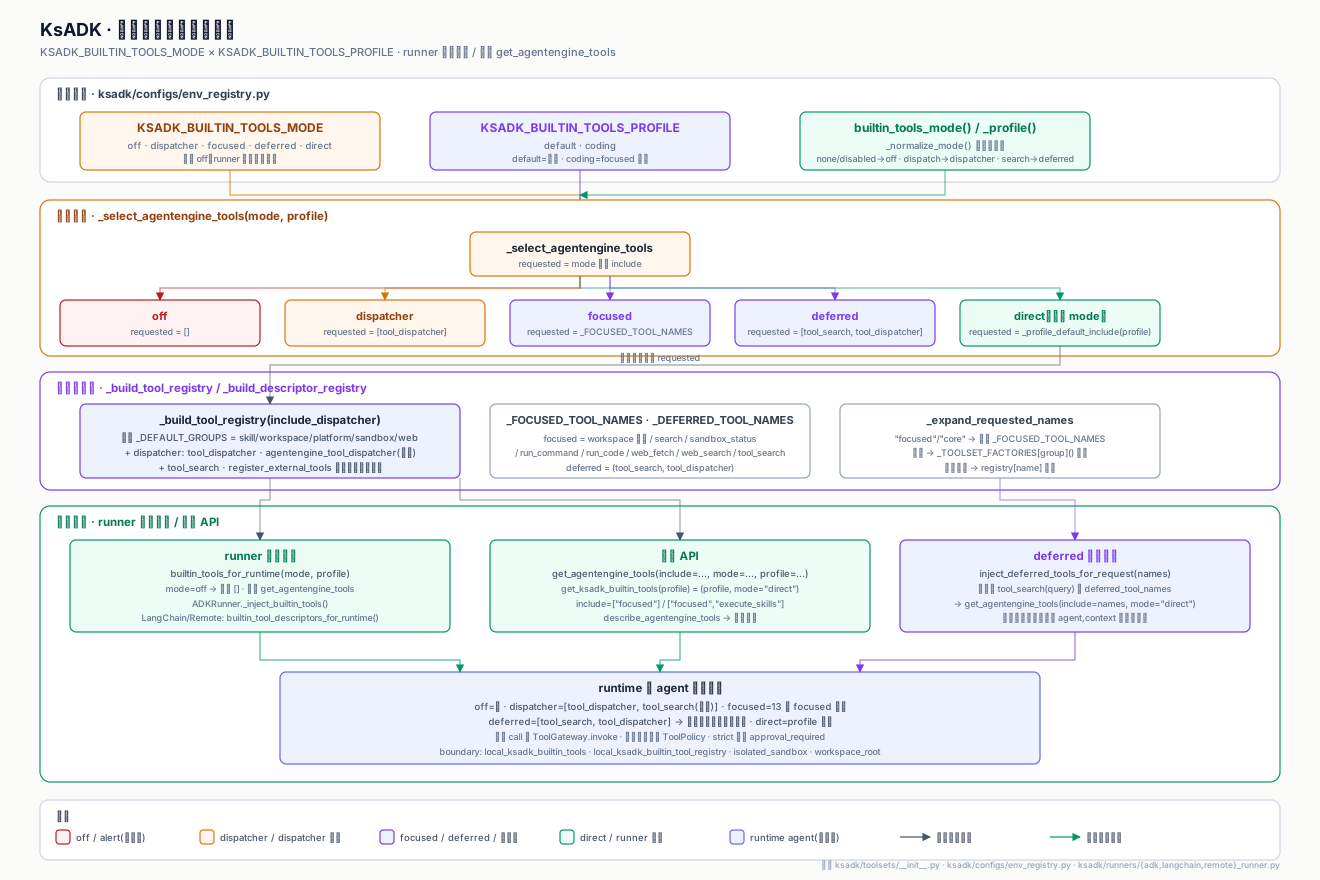
from ksadk.toolsets import builtin_tools_for_runtime

# reads KSADK_BUILTIN_TOOLS_MODE + KSADK_BUILTIN_TOOLS_PROFILE
tools = builtin_tools_for_runtime()  # returns [] when mode=off
mode=deferred suits context-budget-tight hosted scenarios: the runtime only sees tool_search and tool_dispatcher; the model searches first, then calls on demand, keeping full tool descriptions out of context.
| mode | Exposed tools | Use case |
|---|---|---|
off | none | pure framework agent with its own tool set |
direct + default | all built-in tools | local development / debugging |
direct + coding | focused tool set | general coding agent |
focused | focused + tool_search | budget-constrained coding agent |
dispatcher / deferred | tool_dispatcher / tool_search | hosted / multi-tenant, on-demand disclosure |
Skill Service Integration
Skill tools reach the Skill Service through SkillServiceClient. Public docs
only need variable names, never real tokens or control-plane addresses.
| Variable | Purpose | Default / fallback |
|---|---|---|
KSADK_SKILL_SERVICE_URL | Skill Service base URL | inferred from AICP connection |
KSADK_SKILL_SERVICE_ENDPOINT / _SCHEME | explicit endpoint / scheme | AICP mode inference |
KSADK_SKILL_SERVICE_TOKEN | Bearer token | empty |
KSADK_SKILL_SERVICE_ACCESS_KEY | access key | KSYUN_ACCESS_KEY / KS3_ACCESS_KEY |
KSADK_SKILL_SERVICE_SECRET_KEY | secret key | KSYUN_SECRET_KEY / KS3_SECRET_KEY |
KSADK_SKILL_SERVICE_ACCOUNT_ID | account id | KSYUN_ACCOUNT_ID |
KSADK_SKILL_SERVICE_REGION | logical region | KSYUN_REGION / cn-beijing-6 |
KSADK_SKILL_SERVICE_API_VERSION | API version | 2024-06-12 |
KSADK_SKILL_SERVICE_SIGN_SERVICE | signing service name | aicp |
KSADK_SKILL_SPACE_IDS | user Skill Spaces (comma-separated) | SKILL_SPACE_ID fallback |
KSADK_PUBLIC_SKILL_SPACE_IDS | public premade spaces | empty |
KSADK_PUBLIC_SKILL_ALLOWLIST | public skill allowlist | empty (allow all) |
KSADK_SKILL_CACHE_DIR | skill package cache dir | system temp dir |
KSADK_SKILL_MANIFEST_LIMIT | max manifest entries | 30 |
KSADK_SKILL_MANIFEST_TIMEOUT | manifest fetch timeout (s) | 10 |
Once KSADK_SKILL_SPACE_IDS is set, runtime_agent_env_from_process injects the variables above into the subprocess / sandbox environment so Skill tools inside the runtime can reach the same Skill Service. When should_resolve_child_skill_service_url() is true it also writes the inferred service URL into the subprocess, so the child does not re-run AICP inference.
# variable names only; never commit real values
export KSADK_SKILL_SPACE_IDS=space_xxx
export KSADK_SKILL_SERVICE_URL=https://skill-service.example.com
export KSADK_SKILL_SERVICE_TOKEN=$SKILL_SERVICE_TOKEN
Tool Gateway Approval
ToolGateway.invoke reads the ToolPolicy before calling the real
implementation and decides whether to intercept based on
KSADK_TOOL_APPROVAL_MODE:
| mode | Behavior |
|---|---|
off (default) | no interception; execute directly |
strict | medium / high / critical risk tools first return an approval_required envelope |
Skill tool policies:
| Tool | risk_level | side_effects | strict approval |
|---|---|---|---|
list_skills | low | — | no |
search_skills | low | — | no |
load_skill | low | skill_cache_write | no |
execute_skills | high | isolated_runtime_execution | yes |
Approval envelope (approval_required):
{
  "ok": False,
  "type": "approval_required",
  "approval_required": True,
  "approval_request": {
    "id": "appr_xxx",
    "tool_name": "execute_skills",
    "risk_level": "high",
    "side_effects": ["isolated_runtime_execution"],
  },
}
The caller passes approval={"approved": True} to release the call; approved=False
returns approval_rejected. The dispatcher call branch attaches
dispatched_tool_name to the returned envelope so the UI can correlate the
real dispatched tool.
Public Skill Runtime Contract
A public Skill Runtime integration should document:
- the skill name and purpose.
- input schema and required fields.
- output schema and error shape.
- required optional dependencies or extras.
- whether the skill runs locally or through a sandbox backend.
- which environment variables are needed.
- file, network, and execution limits.
The tool description should be precise enough for an LLM to decide when not to call it. Avoid descriptions that imply broad filesystem, shell, network, or credential access.
Environment Configuration
Keep secrets out of source control. Store local development values in .env or your shell environment, and publish only placeholder names in examples.
Common public examples:
If a backend requires credentials, document the variable names and setup steps without publishing actual values:
export EXAMPLE_SANDBOX_API_KEY=...Do not commit .env, .pypirc, PyPI tokens, kubeconfig files, private registry credentials, cloud access keys, or generated runtime state.
Local Backend
The local backend is useful for development, tests, and examples that operate on known input. It should be treated as trusted local execution:
- use temporary directories in tests.
- pass explicit input files instead of scanning the whole repository.
- keep timeouts short.
- return structured failures rather than raw tracebacks when possible.
- avoid examples that execute arbitrary user-provided shell.
Local backend examples are acceptable in public docs when they are deterministic and do not require internal infrastructure.
Sandbox Backend
A sandbox backend is appropriate when the skill needs stronger isolation, network policy, or dependency control. Public docs should describe the contract, not private provider wiring:
| Topic | Public documentation should say |
|---|---|
| authentication | required variable names, not token values |
| limits | timeout, memory, file size, and network policy |
| files | allowed upload/download paths and retention behavior |
| errors | stable error codes or categories |
| cleanup | whether the sandbox is disposable per run |
Internal account IDs, private images, registry hosts, hosted control-plane URLs, and provider-specific support runbooks should stay out of the public repository.
Sandbox Tool Reference
ksadk.toolsets.sandbox exposes three tools, all routed through ToolGateway.
The backend is selected by KSADK_SANDBOX_BACKEND, and sandbox_status reports
the effective boundary.
sandbox_status
Reports AgentEngine sandbox status and boundary. It runs no command.
sandbox_status() -> dict| Item | Value |
|---|---|
| Risk level | low |
| Approval required | No |
| Side effects | None (read-only) |
| Group | sandbox / focused |
Returns ok / backend / enabled / isolated / template_bound / template_id /
timeout_seconds / ttl_seconds / idle_ttl_seconds / max_sessions /
sandbox_id / created_at / last_used_at / expires_at / idle_seconds / boundary.
The boundary field describes the execution scope: isolated backends state
"executes only through the sandbox backend; never exposes the host shell", while
local_process / pod_process note shared local/pod filesystem and network.
| Env var | Purpose | Default |
|---|---|---|
KSADK_SANDBOX_BACKEND | backend (e2b / local_process / pod_process / none) | auto: e2b if template id set, else none |
KSADK_SANDBOX_TEMPLATE_ID | E2B template id | — |
KSADK_SANDBOX_TIMEOUT | per-command timeout seconds | 600 |
KSADK_SANDBOX_TTL_SECONDS | sandbox lifetime TTL | 600 |
KSADK_SANDBOX_IDLE_TTL_SECONDS | idle reclamation seconds | 300 |
KSADK_SANDBOX_MAX_SESSIONS | max reused sessions (0 = unlimited) | 0 |
from ksadk.toolsets.sandbox import sandbox_status

info = sandbox_status()
if not info["enabled"]:
    raise RuntimeError(f"sandbox disabled: {info['boundary']}")
run_command
Runs a shell command inside the isolated sandbox.
run_command(
    command: str,
    cwd: str | None = None,
    timeout: int | None = None,
    env: dict[str, str] | None = None,
    background: bool = False,
    approval: dict | None = None,
) -> dict| Item | Value |
|---|---|
| Risk level | high |
| Approval required | Yes in strict mode |
| Side effects | sandbox_command_execution |
| Group | sandbox |
High risk + explicit approval
- Under
KSADK_TOOL_APPROVAL_MODE=strictit returnsapproval_required; pass backapproval={"approved": True}to execute. - The command policy (
check_command_policy) rejects by default: recursiverm,sudo/kubectl/docker,git reset/clean/push/checkout, and cloud metadata endpoints (169.254.169.254,metadata.google.internal). - The
pod_processbackend requiresKSADK_ALLOW_POD_PROCESS_TOOLS=true, otherwisecreate_sandbox_backendraisesSandboxError. background=Truereturnsbackground_not_supportedin P0.
Returns ok / backend (e.g. sandbox/e2b) / sandbox_id / command / stdout /
stderr / exit_code, plus budget fields stdout_truncated /
stdout_original_chars / stdout_preview_chars (same for stderr), and
persisted_outputs when over threshold.
from ksadk.toolsets.sandbox import run_command

result = run_command(
    "python -c 'print(2+2)'",
    timeout=30,
    approval={"approved": True},
)
assert result["ok"]
print(result["stdout"], result["exit_code"])
run_code
Runs a code snippet through the sandbox. It is not a shell replacement. The
source is written to /tmp/ksadk-run-code-* and the matching interpreter is invoked.
run_code(
    code: str,
    language: str = "python",  # python | javascript | bash
    timeout: int | None = None,
    env: dict[str, str] | None = None,
    approval: dict | None = None,
) -> dict| Item | Value |
|---|---|
| Risk level | high |
| Approval required | Yes in strict mode |
| Side effects | sandbox_code_execution |
| Group | sandbox |
High risk + isolated backend only
- Only isolated backends (
e2b) are accepted;local_process/pod_processreturnisolated_sandbox_required— snippet execution must not land on the shared pod filesystem. - Supports
python(aliasespy/python3),javascript(js/node/nodejs), andbash(sh/shell). Other languages returnunsupported language.
Returns ok / backend / sandbox_id / execution_model="snippet_runner" /
boundary / language / path / command / stdout / stderr / exit_code.
from ksadk.toolsets.sandbox import run_code

result = run_code(
    "import math; print(math.sqrt(16))",
    language="python",
    approval={"approved": True},
)
assert result["ok"]
E2B Sandbox Backend
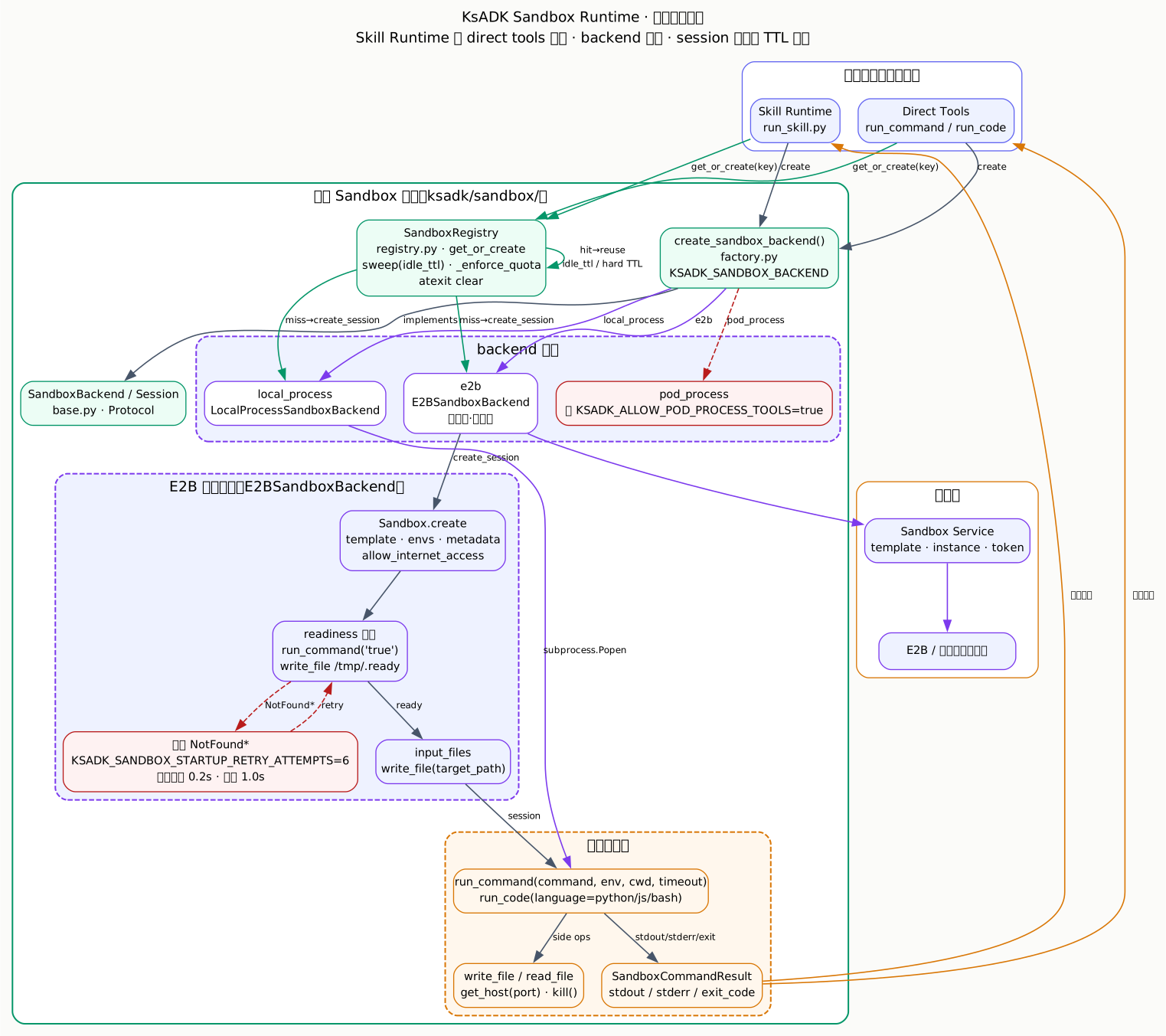
When KSADK_SANDBOX_BACKEND=e2b (or a template id is configured, which auto-selects
e2b), create_sandbox_backend() returns an E2BSandboxBackend that boots an
isolated sandbox via e2b.Sandbox.create(template=..., envs=..., allow_internet_access=...).
Startup retries the true command and a readiness probe up to
KSADK_SANDBOX_STARTUP_RETRY_ATTEMPTS (default 6) times with exponential backoff
of KSADK_SANDBOX_STARTUP_RETRY_DELAY (default 0.2s).
| Env var | Purpose | Default |
|---|---|---|
KSADK_SANDBOX_TEMPLATE_ID / KSADK_SKILL_RUNTIME_TEMPLATE_ID | E2B template id (required; missing raises SandboxError) | — |
KSADK_SANDBOX_TIMEOUT | sandbox lifetime seconds | 900 |
KSADK_SANDBOX_TYPE | aio / thread (SandboxType) | aio |
KSADK_SANDBOX_ALLOW_INTERNET_ACCESS | allow outbound internet | true |
KSADK_SANDBOX_STARTUP_RETRY_ATTEMPTS | startup retry count | 6 |
KSADK_SANDBOX_STARTUP_RETRY_DELAY | startup retry backoff base (seconds) | 0.2 |
KSADK_SANDBOX_SESSION_ID | pinned reuse session key | derived from ToolExecutionContext.session_id |
E2B requires e2b>=2.0.0. When not installed, create_session raises
SandboxError("e2b>=2.0.0 is required for KSADK_SANDBOX_BACKEND=e2b").
Session reuse is managed by GLOBAL_SANDBOX_REGISTRY: run_command/run_code
with the same session key share a sandbox, reclaimed after
KSADK_SANDBOX_IDLE_TTL_SECONDS of idle time. Isolated backends also sync the
workspace root into /workspace/, bounded by KSADK_SANDBOX_SYNC_MAX_FILES /
KSADK_SANDBOX_SYNC_MAX_FILE_BYTES / KSADK_SANDBOX_SYNC_MAX_TOTAL_BYTES, and
skip .git / __pycache__ / .venv / node_modules / .pytest_cache.
Web Tool Reference
ksadk.toolsets.web exposes web_fetch and web_search. Both are low risk
but still go through the Tool Gateway, so strict mode can intercept them.
web_fetch
Fetches a public HTTP(S) URL and returns sanitized text with script/style/noscript stripped.
web_fetch(
    url: str,
    max_chars: int | None = None,
    timeout: int = 30,
) -> dict| Item | Value |
|---|---|
| Risk level | low |
| Approval required | No (but constrained by SSRF policy) |
| Side effects | None (read-only HTTP GET) |
| Group | web |
SSRF protection
_validate_public_http_url applies three checks before the request:
- The scheme must be
http/httpsand the host is required. socket.getaddrinforesolves every A/AAAA record.- Each IP is checked with
ipaddress.ip_addressforis_loopback/is_private/is_link_local/is_multicast/is_reserved; a match returnsblocked_by_ssrf_policy.
Redirects are re-validated hop by hop, up to 5 hops; beyond that it returns
too_many_redirects. KSADK_WEB_SSRF_POLICY_JSON (or
OPENCLAW_BROWSER_SSRF_POLICY_JSON) can pass {"allow_private": true} to
disable private-network blocking — only use this in a trusted internal network.
Returns ok / url / final_url / status_code / content_type /
text / truncated / original_chars / preview_chars, plus
persisted={"path": ..., "mime_type": ...} when over threshold.
from ksadk.toolsets.web import web_fetch

doc = web_fetch("https://example.com/docs", max_chars=20000)
if doc["ok"]:
    print(doc["final_url"], doc["content_type"])
    if doc.get("truncated"):
        print("persisted at", doc["persisted"]["path"])
web_search
Returns title/url/snippet results without fetching full pages. The provider
is selected by KSADK_WEB_SEARCH_PROVIDER (or OPENCLAW_WEB_SEARCH_PROVIDER);
if unset, it returns provider_not_configured.
web_search(
    query: str,
    max_results: int = 5,
    recency_days: int | None = None,  # http provider only
) -> dict| Item | Value |
|---|---|
| Risk level | low |
| Approval required | No |
| Side effects | None (read-only search API) |
| Group | web |
| provider | Description | Credential vars |
|---|---|---|
fake | Test provider returning fixed fake results; no credential needed | — |
http | Generic HTTP search API (GET, Bearer auth, supports recency_days) | KSADK_WEB_SEARCH_API_KEY |
ksyun | Kingsoft Cloud AI Search (POST, scope=webpage/document/scholar/podcast/video) | KSADK_WEB_SEARCH_API_KEY / KSADK_MCP_KEY / KSC_AIPRO_API_KEY |
Returns ok / query / provider / results[] (each with
title / url / snippet / rank / provider; ksyun also includes date).
| Env var | Purpose |
|---|---|
KSADK_WEB_SEARCH_PROVIDER | fake / http / ksyun |
KSADK_WEB_SEARCH_BASE_URL | http/ksyun endpoint (ksyun defaults to https://search.aipro.ksyun.com/v1/aisearch/search) |
KSADK_WEB_SEARCH_API_KEY | Bearer token |
KSADK_WEB_SEARCH_SCOPE | ksyun scope, defaults to webpage |
import os
os.environ["KSADK_WEB_SEARCH_PROVIDER"] = "ksyun"
os.environ["KSADK_WEB_SEARCH_API_KEY"] = "..."

from ksadk.toolsets.web import web_search

res = web_search("ksadk agent runtime", max_results=5)
for item in res["results"]:
print(item["rank"], item["title"], item["url"])import os
os.environ["KSADK_WEB_SEARCH_PROVIDER"] = "http"
os.environ["KSADK_WEB_SEARCH_BASE_URL"] = "https://search.example.com/v1/search"
os.environ["KSADK_WEB_SEARCH_API_KEY"] = "..."
from ksadk.toolsets.web import web_search
res = web_search("agent sdk", max_results=3, recency_days=7)import os
os.environ["KSADK_WEB_SEARCH_PROVIDER"] = "fake"
from ksadk.toolsets.web import web_search
res = web_search("anything") # test only, no real requestToolResultBudget
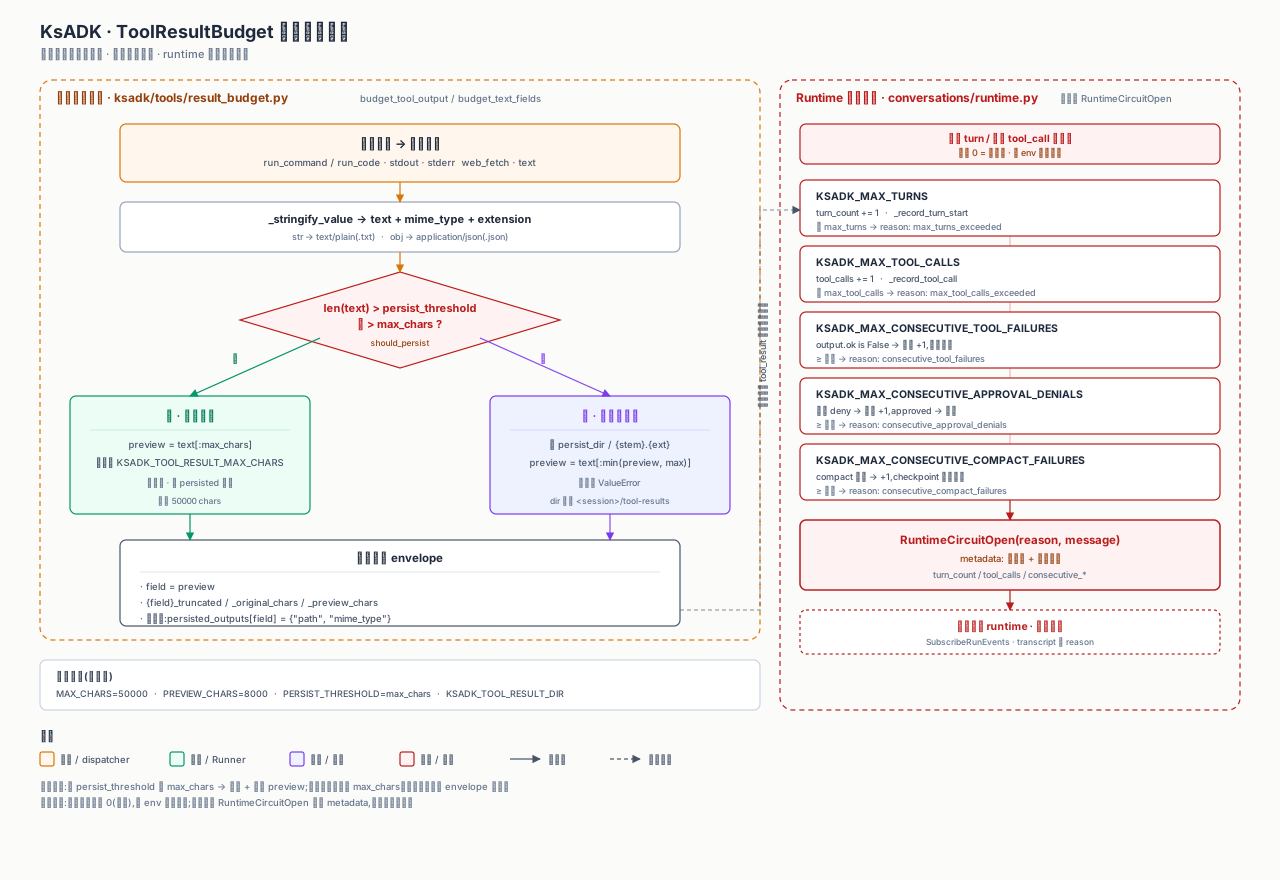
ksadk.tools.result_budget truncates and persists large outputs so huge
stdout/text is not pushed into the model context. run_command / run_code
call budget_text_fields on stdout/stderr; web_fetch calls
budget_tool_output on text.
| Env var | Purpose | Default |
|---|---|---|
KSADK_TOOL_RESULT_MAX_CHARS | max chars per field | 50000 |
KSADK_TOOL_RESULT_PREVIEW_CHARS | preview length when persisted | 8000 |
KSADK_TOOL_RESULT_PERSIST_THRESHOLD_CHARS | threshold above which output is persisted | same as max_chars |
KSADK_TOOL_RESULT_DIR | persist directory | <session_dir>/tool-results |
The return structure adds <field>_truncated / <field>_original_chars /
<field>_preview_chars alongside the original field, and the persisted file is
placed in persisted_outputs[<field>] = {"path", "mime_type"}. Paths always stay
inside persist_dir; escaping raises ValueError.
Runner Payload
Framework adapters should pass tool and skill results as structured data. A typical result includes:
| Field | Meaning |
|---|---|
name | tool or skill name |
status | ok, failed, timeout, or cancelled |
content | user-visible result text or content blocks |
metadata | execution metadata safe for logs and UI |
artifacts | file references created by the tool, when supported |
error | stable error summary for failed runs |
Business code should read structured fields instead of parsing local UI text.
ADK Integration
For Google ADK projects, Skill Runtime tools can be injected during runner loading when optional dependencies and configuration are available. Keep a minimal ADK example free of optional runtime variables first, then add tools in a separate example:
from google.adk.agents import Agent

root_agent = Agent(
    name="tool_ready_agent",
    instruction="Use tools only when they are relevant to the user request.",
)
Then document the runtime setup beside the example:
pip install -U "ksadk[adk,skills]"
agentengine web . --no-open
If the tool is not available, the agent project should still fail with a clear setup error instead of silently running with a different capability set.
Testing Tool Integrations
Public tests should cover the boundary, not a private service account:
- tool schema conversion.
- successful local execution with deterministic input.
- timeout and failure handling.
- runner payload fields.
- Web UI request shape when the tool result is displayed.
- audit checks that no credentials or private endpoints appear in fixtures.
Prefer fake clients, temporary files, and local HTTP servers for public tests. Only run provider-backed tests behind explicit environment gates.
Security Checklist
Before publishing a tool or skill example:
- verify the example runs without internal accounts.
- remove private endpoints and customer data.
- check that generated files are ignored.
- document required optional extras.
- cap execution time and file sizes.
- avoid broad shell, network, or filesystem access.
- run the open-source audit before committing.
Account Boundary And invocation_id
New in 0.6.7
The runtime writes a single PlatformInvocationContext. Memory, sandbox,
workspace, and skill all read context scoped to the current account.
Requests entering the runner can carry an account identifier. The OpenAI
compatible endpoints /v1/responses and /v1/chat/completions, and the
internal RunAgentAction, all accept account_id (AccountId on the
A2A / gRPC side). The runtime writes it into PlatformInvocationContext so
downstream components isolate data by account boundary.
| Endpoint | Field | Notes |
|---|---|---|
/v1/responses | account_id | OpenAI compatible Responses API |
/v1/chat/completions | account_id | OpenAI compatible Chat Completions API |
RunAgentAction | AccountId | internal runner / A2A / gRPC action |
Downstream modules read the current account through the runtime-provided context accessors instead of parsing request headers themselves:
from ksadk.runtime_context import get_current_account_id, get_current_invocation_context

account_id = get_current_account_id()
ctx = get_current_invocation_context()
PlatformInvocationContext at minimum carries:
account_id: the current account boundary.agent_id/user_id/session_id: the related invocation identifiers.- optional attachment, memory, and knowledge context fields.
The single-run invocation_id is carried by ToolExecutionContext and threads
through the execution alongside the context above.
When memory, sandbox, workspace, and skill execute tools or read and write
state, they read the current PlatformInvocationContext so that data, files,
and skill execution do not leak across accounts.
invocation_id is the stable identifier for a single run and threads through
the whole path:
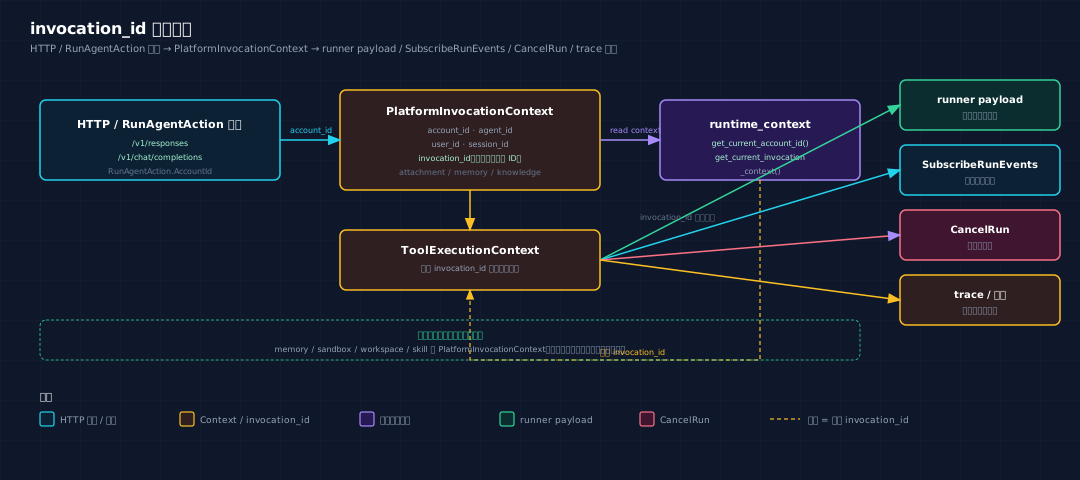
- The runner payload carries
invocation_idso local and remote views line up. SubscribeRunEventsandCancelRunlocate the run instance byinvocation_id.- Trace and observability data use the same
invocation_idto correlate stalls and failures.
Prefer context accessors for account boundary
Tools and business code should call get_current_account_id() /
get_current_invocation_context() instead of parsing request headers or
caching account_id manually. This avoids picking up the wrong account
inside a sandbox or an async branch.
See Agent Context for the full context fields and accessors, and OpenAI Compatible API for the HTTP endpoint fields.
Relationship To Other Guides
Read this page with:
- Frameworks for runner loading behavior.
- Agent Context for the structured invocation context.
- Attachments And Multimodal Input for file input normalization.
- Runtime Sessions And Files for how tool events and file references are stored in local sessions.