LangGraph with AgentEngine Built-in Toolsets
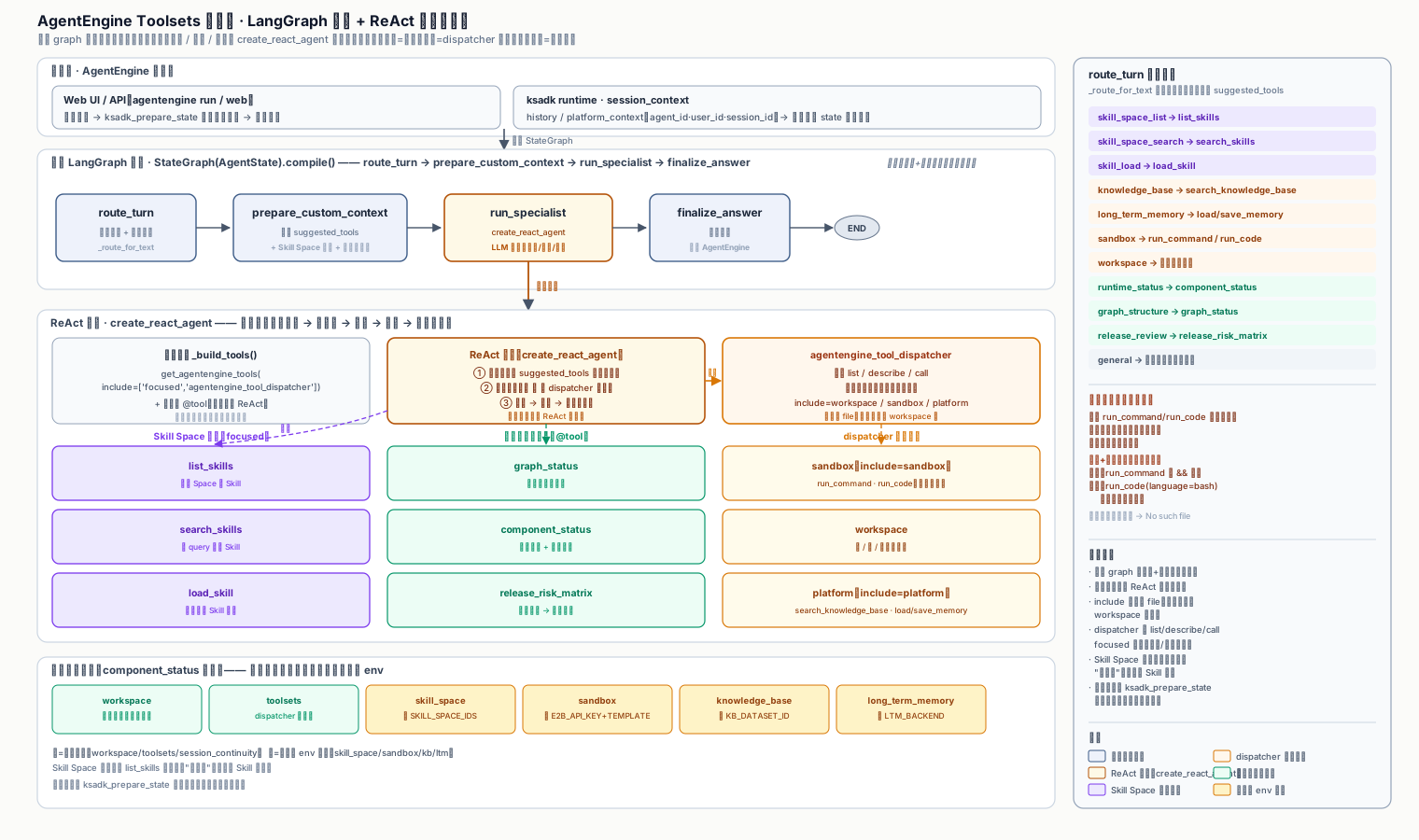
This tutorial is distilled from a real, runnable demo. The outer LangGraph graph only does routing and context injection; the actual tool selection and invocation is delegated to a ReAct subgraph built with create_agent, which talks to KSADK built-in toolsets — Skill Space, Workspace, Sandbox, Knowledge Base, and Long-Term Memory.
It is not a "chat template". It demonstrates a transferable engineering pattern: the graph orchestrates, the model decides, the tools are hosted by AgentEngine.
Core design
Why split it this way
Driving every tool choice through outer if/else is brittle: each new tool forces a routing-table edit, and multi-turn follow-ups cannot be handled. This demo pushes tool decisions down into a ReAct subgraph. The outer layer only does semantic routing (knowledge base? sandbox? skill space?) and injects the scenario hint plus context into the subgraph. The model then autonomously calls list_skills / search_skills / run_command / search_knowledge_base inside the subgraph.
The graph has four nodes:
route_turn— Inspects the latest user message, identifies a scenario (knowledge base / long-term memory / workspace / sandbox / skill space / graph structure / release review), and produces only aroutedict. It calls no tools.prepare_custom_context— Assemblescustom_contextfrom the routing hint, Skill Space IDs, and platform identity (agent_id / user_id / account_id / session_id), then injects it downstream.run_specialist— Builds a ReAct subgraph withlangchain.agents.create_agent, binds KSADK focused toolsets plus three custom business tools, prepends the context as a SystemMessage, and lets the model call tools autonomously.finalize_answer— Walks back through the subgraph messages to find the lastAIMessageand returns it as the final answer to AgentEngine.
workflow = StateGraph(AgentState)
workflow.add_node("route_turn", route_turn)
workflow.add_node("prepare_custom_context", prepare_custom_context)
workflow.add_node("run_specialist", run_specialist)
workflow.add_node("finalize_answer", finalize_answer)
workflow.add_edge(START, "route_turn")
workflow.add_edge("route_turn", "prepare_custom_context")
workflow.add_edge("prepare_custom_context", "run_specialist")
workflow.add_edge("run_specialist", "finalize_answer")
workflow.add_edge("finalize_answer", END)

root_agent = workflow.compile()
Binding tools: focused + dispatcher
KSADK organizes built-in tools into groups. This demo directly binds only the high-frequency focused group plus agentengine_tool_dispatcher; lower-frequency or higher-risk tools (Skill, Sandbox, Knowledge Base, Long-Term Memory) are reached indirectly through the dispatcher.
FOCUSED_TOOLSETS = ["focused", "agentengine_tool_dispatcher"]
AGENTENGINE_TOOL_DESCRIPTIONS = describe_agentengine_tools(include=FOCUSED_TOOLSETS)

def _build_tools() -> list[BaseTool]:
    agentengine_tools = [
        tool_item
        for tool_item in get_agentengine_tools(include=FOCUSED_TOOLSETS)
        if _tool_name(tool_item) != "component_status"
    ]
    return [*agentengine_tools, graph_status, component_status, release_risk_matrix]
Since 0.6.8 Skill tools are not in focused
list_skills / search_skills / load_skill are no longer part of focused as of 0.6.8. To let the ReAct subgraph call them, you must go through agentengine_tool_dispatcher(include="skill") to list/describe/call indirectly. The rationale is to isolate low-frequency actions that may trigger external service calls from high-frequency tools, so the model does not stuff the entire Skill list into context on every turn.
describe_agentengine_tools(include=...) fetches tool schemas before binding, so component_status can report "which groups are bound, which tool names each group contains" without actually invoking any tool. This is valuable for debugging and observability.
ReAct subgraph: let the model choose tools
run_specialist is the heart of the demo. It contains no if tool_name == ... branches. Instead it stuffs the routing result and context into a SystemMessage, hands the tool list to create_agent, and lets the model decide inside the ReAct loop.
def run_specialist(state: AgentState) -> dict[str, Any]:
    model = make_chat_model()
    specialist = create_agent(
        model,
        TOOLS,
        system_prompt=SYSTEM_PROMPT,
        name="agentengine_toolsets_specialist",
    )
    route = state.get("route") or {}
    custom_context = state.get("custom_context") or {}
    messages = [
        SystemMessage(
            content=(
                f"Outer LangGraph route: {route}. "
                f"Custom context: {custom_context}. "
                "Prefer tools from suggested_tools; when a tool is unavailable, "
                "state which environment variables are missing."
            )
        ),
        *state["messages"],
    ]
    result = specialist.invoke({"messages": messages})
    return {"specialist_messages": result.get("messages", [])}
The system prompt is the contract of this pattern
Notice that SYSTEM_PROMPT explicitly states "each sandbox call is ephemeral; generation and reading must be merged into the same call" and "when not configured, return the real error, do not fabricate a Skill list". These are not doc comments — they are model behavior constraints. Writing error-prone runtime semantics (sandbox lifecycle, degradation policy) into the system prompt is far more effective than burying them in code comments, because the model actually reads them.
Key pitfall: sandbox lifecycle
This is the single most valuable engineering lesson in this demo.
Each sandbox call is ephemeral; files do not persist across calls
run_command / run_code always execute in a brand-new isolated sandbox, and the sandbox is destroyed the moment the command finishes. If you "generate an artifact in one call, then read it in the next call", the second call will inevitably return No such file or directory.
The correct approach is to merge "generate + read" into a single call:
- Simple operations: chain with
&&inrun_command, e.g.python3 -c "..." && cat /home/user/outputs/x.html. - Multi-step operations: write a script and run it once with
run_code(language="bash").
This rule is written both into the system prompt and into the multi_step_hint returned by component_status, so the model can self-check before calling.
Key pitfall: e2b version vs. KSYUN UUID key
The KSYUN sandbox manager currently uses UUID-style E2B_API_KEY values. Upstream e2b>=2.25.0 enforces client-side that the key must have an e2b_ prefix, so a UUID key is rejected before any request is sent.
ksadk[langgraph,skills]>=0.6.8
# KSYUN sandbox manager currently uses UUID-style E2B_API_KEY values.
# Upstream e2b>=2.25.0 rejects those keys client-side before contacting E2B_API_URL.
e2b==2.24.0
Pin e2b==2.24.0
If you see an error like Invalid API key format: expected "e2b_", your local install has drifted to e2b>=2.25.0. Run uv pip install -r requirements.txt to downgrade to 2.24.0. The demo also ships _e2b_key_compatibility() to self-check the key shape against the installed SDK, and component_status reports the result.
Run steps
- Install dependencies
cd langgraph-toolsets-demo
uv venv
uv pip install -r requirements.txt
Prefer uv run so the project .venv is used — in particular the pinned e2b==2.24.0.
- Configure environment
cp .env.example .envAt minimum you need an OpenAI-compatible model config (OPENAI_API_KEY, OPENAI_MODEL_NAME). OPENAI_BASE_URL can be left unset; agentengine run/web auto-detects based on the network environment. To enable Skill Space, also fill in KSADK_SKILL_SPACE_IDS and Skill Service credentials.
- Run interactively
uv run agentengine run -i .- Or launch the Web UI / API server
uv run agentengine web .- Verify the capability matrix
Try these prompts in order and observe how the model reaches different tool groups indirectly through the dispatcher:
What's the current component status? Which capabilities need extra config?
What skills are in the space?
Run python3 --version in the sandbox.
Generate /home/user/outputs/ksadk-intro.html in the sandbox and print its contents.
Search the knowledge base for deployment-related content.
Save a long-term memory: I prefer root cause before fix.
Project structure
agentengine.yaml declares the framework and entry point so AgentEngine can load root_agent:
name: langgraph-toolsets-demo
version: "1.0.0"
framework: langgraph
entry_point: toolsets_agent/agent.py
agent_variable: root_agent
Adapting to a business agent
_route_for_text is a pure function that maps a user message to a scenario + suggested_tools dict by keyword. Swap the keywords for your domain (orders, tickets, compliance, ops), and append business context (current tenant, recent ticket summary) in prepare_custom_context. The rest of the graph is reusable as-is.
Append your business tools (query orders, call internal APIs) to the [*agentengine_tools, ...] list in _build_tools(). The model sees both KSADK built-in tools and your business tools and chooses autonomously. Write clear docstrings — they are the model's only cue for picking a tool.
If you have hard orchestration needs (e.g. must authorize before calling an external system), insert an authorize node between route_turn and run_specialist and wire it with workflow.add_node / add_edge. Keep the boundary "the outer graph only orchestrates, it does not call tools on the model's behalf" — that is what keeps the code maintainable.
If you do not need sandbox or knowledge base, narrow FOCUSED_TOOLSETS, or restrict include when calling the dispatcher. Fewer tools means lower token cost and less chance the model picks the wrong tool.
Observability tip
The component_status and graph_status tools are not just for end users. When debugging in the local Web UI, ask "what's the current component status" first to immediately see which toolsets are misconfigured and which env vars are missing — no log diving required. Consider keeping a similar "introspection tool" in your own business agent.
Further reading
ksadk-samples
Full source of this demo and more samples (placeholder link; use the actual repo URL).
Build a LangGraph agent
A minimal LangGraph agent from scratch; run this first to validate the basic loop.
Frameworks
Reference for framework adapters and runner loading boundaries.
Sessions & files
Runtime semantics for sessions, uploads, and workspace files.