Long-Task Resume and Deep Research Continuation
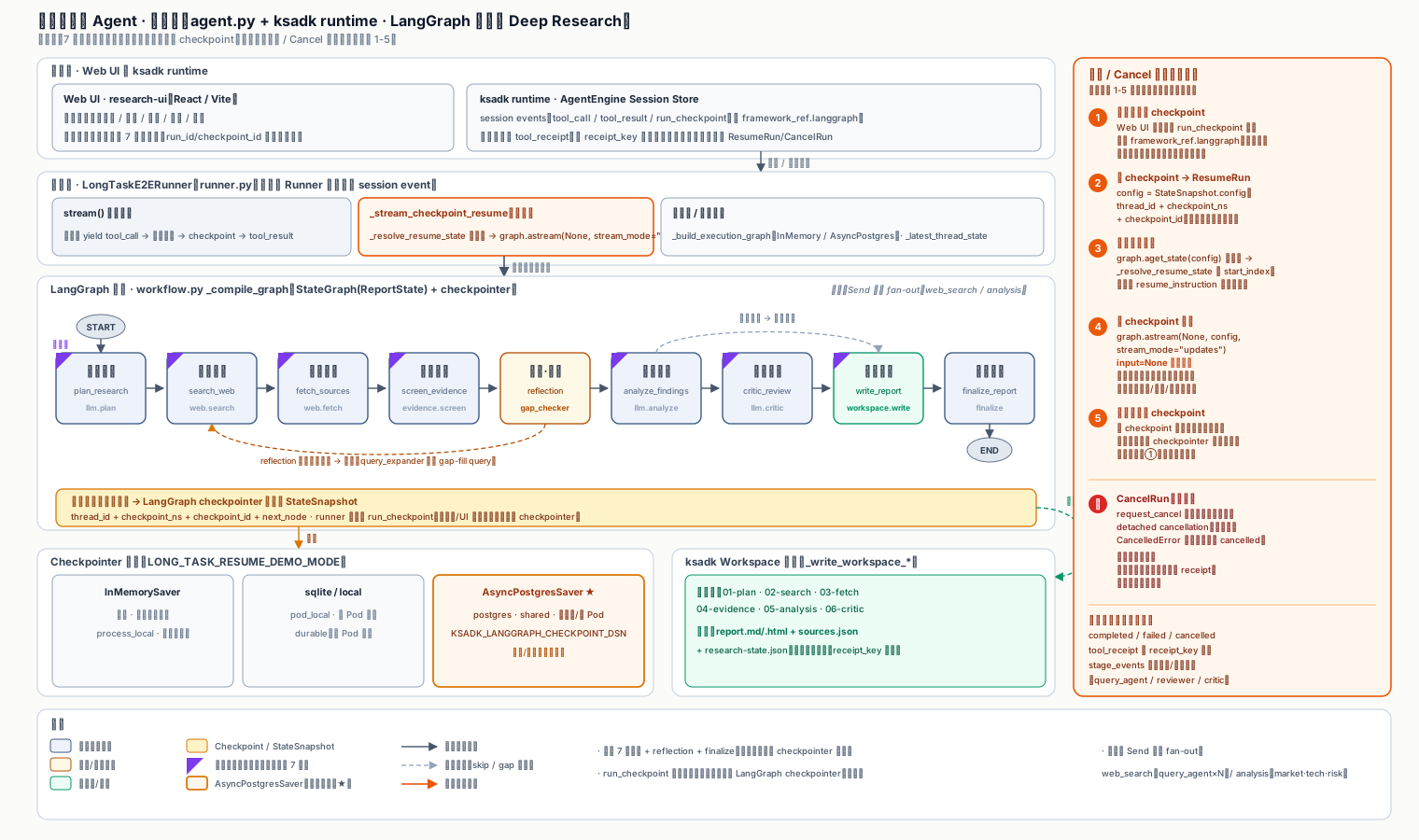
This tutorial is derived from a real, runnable demo: a 7-stage Deep Research workflow persisted with a LangGraph checkpointer. It shows how to select a state snapshot in the Web UI and continue execution via ResumeRun reusing the same run_id, instead of re-running from scratch.
It is not a fake progress bar: every stage calls real external tools (web_search / web_fetch / LLM / Workspace file writes), and the task may be interrupted by a process restart, a network blip, the user closing the Web UI, or an explicit cancel. On resume, the agent must avoid repeating side-effecting tool calls (double billing, duplicate file writes, duplicate workspace writes).
What problem does it solve
Why not just re-run the task
Long tasks usually involve paid APIs, file writes, ticket submissions, or state mutations. Re-running causes side effects: double billing, duplicate files, duplicate tickets. The right approach is to split the task into "safely resumable" business boundaries, write a LangGraph checkpoint at each boundary, and on resume only run the nodes after the checkpoint while consulting tool receipts to skip completed tools.
Suitable scenarios:
- The agent runs research, Deep Research reports, code fixes, or data analysis — long-running tasks.
- The task may be interrupted by a process restart, a network blip, the user closing the Web UI, or an explicit cancel.
- On resume, the agent must avoid repeating external tool calls (double billing, duplicate file writes, duplicate workspace writes).
- You want to understand checkpoint / ResumeRun / CancelRun engineering boundaries locally before wiring up the real AgentEngine session store.
Graph structure
The main graph has 7 business safety points. After each stage completes, the LangGraph checkpointer writes a StateSnapshot automatically:
| Layer | LangGraph usage | Notes |
|---|---|---|
| Main graph | StateGraph(ReportState) + checkpoint | 7 resumable business safety points; one checkpoint per stage. |
| web_search subgraph | add_conditional_edges(START, fan_out) + Send | Fans out the research plan's queries in parallel to query_agent, then reduces. |
| Gap-fill loop | reflection node + _reflection_router | When first-round evidence is insufficient, appends gap-fill queries and loops back to search_web. |
| Analysis subgraph | Send map-reduce | Runs multiple reviewers in parallel over the evidence table for LLM cross-analysis. |
| Conditional routing | add_conditional_edges("analyze_findings", ...) | Defaults to critic_review; the analysis stage simulates one external service failure. |
| Resume execution | graph.astream(None, config=checkpoint_config, stream_mode="updates") | ResumeRun uses the checkpoint config to continue; nodes before the checkpoint are not replayed. |
The 7 business safety points are defined in stages.py:
REPORT_STAGES = (
    ReportStage(key="plan_research",   title="Plan research questions", receipt_key="deepresearch:plan:v1",           tool_name="llm.plan",         ...),
    ReportStage(key="search_web",      title="Search the public web",   receipt_key="deepresearch:web_search:v1",     tool_name="web.search",        ...),
    ReportStage(key="fetch_sources",   title="Fetch source bodies",     receipt_key="deepresearch:web_fetch:v1",     tool_name="web.fetch",         ...),
    ReportStage(key="screen_evidence", title="Screen and dedupe evidence", receipt_key="deepresearch:evidence_screen:v1", tool_name="evidence.screen", ...),
    ReportStage(key="analyze_findings",title="Cross-analyze findings",  receipt_key="deepresearch:analysis:v1",      tool_name="llm.analyze",       ...),
    ReportStage(key="critic_review",   title="Critical review",         receipt_key="deepresearch:critic:v1",        tool_name="llm.critic",        ...),
    ReportStage(key="write_report",    title="Generate research report", receipt_key="deepresearch:report:v1",       tool_name="workspace.write",   ...),
)
Every stage needs a stable receipt_key
receipt_key is the tool idempotency key (e.g. deepresearch:web_search:v1). On resume it is used to decide whether a tool already ran successfully. If receipt_key is unstable (e.g. it includes a timestamp or random value), it cannot be matched on resume and the tool runs again. Use the business-object:tool:version pattern.
Main graph compilation
The main graph chains the 7 stages in order, inserting a reflection node and conditional router after screen_evidence: if evidence is sufficient, go to analyze_findings; otherwise loop back to search_web for another round. Checkpoints are written automatically by the LangGraph checkpointer — do not forge checkpoint bodies yourself.
def _compile_graph(checkpointer: Any) -> Any:
    graph = StateGraph(ReportState)
    for stage in REPORT_STAGES:
        graph.add_node(stage.key, _stage_node(stage))
    graph.add_node("finalize_report", finalize_report)
    graph.add_node("reflection", _run_reflection_node)
    graph.add_edge(START, "plan_research")
    graph.add_edge("plan_research", "search_web")
    graph.add_edge("search_web", "fetch_sources")
    graph.add_edge("fetch_sources", "screen_evidence")
    graph.add_edge("screen_evidence", "reflection")
    graph.add_conditional_edges(
        "reflection",
        _reflection_router,
        {"search_web": "search_web", "analyze_findings": "analyze_findings"},
    )
    graph.add_conditional_edges(
        "analyze_findings",
        lambda state: "critic_review" if state.get("requires_critic_review", True) else "write_report",
        {"critic_review": "critic_review", "write_report": "write_report"},
    )
    graph.add_edge("critic_review", "write_report")
    graph.add_edge("write_report", "finalize_report")
    graph.add_edge("finalize_report", END)
    return graph.compile(checkpointer=checkpointer)
_reflection_router caps the gap-fill loop count and forces analysis once max_research_loops is reached, preventing unbounded search:
def _reflection_router(state: ReportState) -> str:
    loop_count = int(state.get("research_loop_count") or 0)
    cfg = ResearchConfig.from_state(state)
    if state.get("is_sufficient") or loop_count >= cfg.max_research_loops:
        return "analyze_findings"
    return "search_web"
Subgraphs: parallel fan-out with Send
The web_search subgraph fans the research plan's queries out in parallel to query_agent. Each query searches independently, then reduce_queries merges them. This is LangGraph's map-reduce pattern: add_conditional_edges(START, fan_out) returns multiple Send objects, each creating a parallel query_agent instance.
def _build_web_search_subgraph():
    def fan_out_queries(state: WebSearchState):
        queries = state.get("queries") or [state.get("query", "")]
        return [Send("query_agent", {"query": state.get("query", ""), "queries": [query]}) for query in queries]

    async def query_agent(state: WebSearchState) -> WebSearchState:
        query = (state.get("queries") or [state.get("query", "")])[0]
        max_results = int(state.get("max_results") or ResearchConfig.from_env().search_results_per_query)
        results = await _web_search(query, max_results=max_results)
        return {"search_packets": [{"agent": "web_search_agent", "query": query, "results": results}]}

    def reduce_queries(state: WebSearchState) -> WebSearchState:
        packets = state.get("search_packets") or []
        digest = "; ".join(f"{packet['query']}={len(packet.get('results') or [])} items" for packet in packets)
        return {"search_digest": digest}

    graph = StateGraph(WebSearchState)
    graph.add_node("query_agent", query_agent)
    graph.add_node("reduce_queries", reduce_queries)
    graph.add_conditional_edges(START, fan_out_queries)
    graph.add_edge("query_agent", "reduce_queries")
    graph.add_edge("reduce_queries", END)
    return graph.compile(name="web_search_subgraph")
The analysis subgraph does the same, fanning the evidence table out to multiple reviewers (fact_reviewer / implication_reviewer / risk_reviewer) that each run an independent LLM cross-analysis, then reduce:
def fan_out_reviewers(state: AnalysisState):
    reviewers = state.get("reviewers") or ["fact_reviewer", "implication_reviewer", "risk_reviewer"]
    return [
        Send("analysis_reviewer", {
            "query": state.get("query", ""),
            "evidence_table": state.get("evidence_table", []),
            "reviewers": [reviewer],
        })
        for reviewer in reviewers
    ]
Subgraphs can be complex; main-graph resume points stay clean
You can keep adding subgraphs (gap-fill expansion, multiple reviewers, multi-round reflection) for business complexity, but the main-graph resume points must stay clear — the Web UI only exposes safely resumable main-graph checkpoints, not every internal node. Subgraph and tool nodes are forwarded to the frontend as tool_call / tool_result via stage_events.
ResumeRun: continue from a checkpoint, not re-run
This is the core of the demo. ResumeRun is not "run it again"; it is:
- Find the
run_checkpointevent matchingrun_idandcheckpoint_id. - Extract
thread_id, optionalcheckpoint_ns, andcheckpoint_idfromframework_ref.langgraph. - Build a LangGraph checkpoint config from those fields and continue with
input=None. - Query tool receipts to mark already-succeeded tool calls, avoiding duplicate search, file writes, or report writes.
- Only run nodes after the checkpoint, and keep writing new checkpoints.
async for update in graph.astream(
    None,
    config=config,
    context=self.build_native_context(payload.get("platform_context")),
    stream_mode="updates",
):
    stage = self._stage_from_update(update)
    if stage is None:
        continue
    # Only updates for nodes after the checkpoint are processed; pre-checkpoint nodes are not replayed.
    ...
input=None is the key: it tells LangGraph to continue from the checkpoint rather than re-submitting the user question. Passing a real state would make LangGraph execute from START again.
When building the checkpoint config, thread_id / checkpoint_ns / checkpoint_id must come from StateSnapshot.config:
@staticmethod
def _checkpoint_config_from(config: dict[str, Any]) -> dict[str, Any]:
    configurable = dict((config or {}).get("configurable") or {})
    thread_id = str(configurable.get("thread_id") or "").strip()
    checkpoint_id = str(configurable.get("checkpoint_id") or "").strip()
    if not thread_id:
        return dict(config or {})
    return {
        "configurable": {
            "thread_id": thread_id,
            "checkpoint_ns": str(configurable.get("checkpoint_ns") or ""),
            "checkpoint_id": checkpoint_id,
        }
    }
Do not keep checkpoint_id when reading the latest thread state
Reading the "current latest state of a thread" must use a config without checkpoint_id. Keeping it makes LangGraph return that historical snapshot instead of the resumed state, so on resume you read stale state. _thread_config_from builds a config with only thread_id + checkpoint_ns for reading the latest state.
Background job: the stage loop and checkpoint writes
The background job runs the stage loop inside the stream body and yields events; the platform consumes them to write session events, run_checkpoint index entries, and terminal status. Each stage runs: tool_call → execute node → forward sub-tool events → checkpoint → tool_result → progress text.
for stage in REPORT_STAGES:
    yield {"type": "tool_call", "tool_name": stage.tool_name, ...}
    await asyncio.sleep(_stage_delay_seconds())

    if _should_fail_stage(stage, "start"):
        raise RuntimeError(f"simulated_tool_failure:{stage.key}")

    values, framework_ref, checkpoint_id, graph_config = await self._invoke_graph_step(
        graph, graph_input=graph_input, config=graph_config, stage=stage, payload=payload,
    )
    graph_input = None
    artifact_path = _artifact_path_for_state(values, stage)

    for runtime_event in self._stage_runtime_events(values, stage=stage, run_id=run_id):
        yield runtime_event

    # checkpoint before tool_result: when building tool_receipt the platform queries
    # the latest checkpoint matching run_id from session, so checkpoint must be written first.
    yield {"type": "checkpoint", "metadata": _checkpoint_metadata_for_ref(stage=stage, run_id=run_id, framework_ref=framework_ref, artifact_path=artifact_path)}
    yield {"type": "tool_result", "tool_name": stage.tool_name, "tool_output": {"ok": True, "receipt_key": stage.receipt_key, "artifact_path": artifact_path, "langgraph_checkpoint_id": checkpoint_id}, ...}
checkpoint must be written before tool_result
When building a tool_receipt, the platform queries "the latest checkpoint matching run_id" from the session. If you write tool_result before checkpoint, the receipt attaches to the previous stage's checkpoint, and tool-skip logic on resume gets misaligned. Always write the checkpoint event before tool_result.
Writing artifacts to Workspace
Every stage writes intermediate artifacts to the Web UI Workspace under research/<topic-slug>/ via ksadk.toolsets.workspace. The final stage also writes deepresearch-report.md, deepresearch-report.html, sources.json, evidence.json, and research-state.json. On resume, tool receipts and the LangGraph checkpoint prevent duplicate file writes.
from ksadk.toolsets.workspace import write_workspace_file, write_workspace_files

def _write_workspace_report_files(state, report_markdown, report_html):
    base_dir = _workspace_artifact_dir(state)
    files = [
        {"path": f"{base_dir}/deepresearch-report.md", "content": report_markdown},
        {"path": f"{base_dir}/deepresearch-report.html", "content": report_html},
        {"path": f"{base_dir}/sources.json", "content": _build_sources_json(state)},
        {"path": f"{base_dir}/evidence.json", "content": _build_evidence_json(state, report_markdown)},
        {"path": f"{base_dir}/research-state.json", "content": _build_research_state_json(state, report_markdown, report_html)},
    ]
    result = write_workspace_files(files, overwrite=True)
    if not isinstance(result, dict) or not result.get("ok"):
        raise RuntimeError(f"write_workspace_files failed for {base_dir}: {result}")
    written = [str(item.get("path", "")) for item in result.get("written", []) if item.get("path")]
    return written, result
Real tool boundaries
This demo is not a pure fixture progress bar by default. The Web/API path calls real tools through this fallback chain:
web_search: prefers the built-in ksadkweb_search(withKSADK_WEB_SEARCH_PROVIDER=ksyun, reusing theKSADK_MCP_KEYcredential via Kingsoft Cloud Xingliu AI Search, returning real time-aware results withdate); when unconfigured it falls back to metaso MCP →DEEPRESEARCH_WEB_SEARCH_URL→ public search pagesbing,sogou; only when all fail does it writesource=fallbackdegraded results.web_fetch: prefers ksadkweb_fetch(with SSRF protection blocking loopback/internal/metadata + HTML cleaning + result budgeting), falling back to direct httpx fetch on failure.llm.plan/analyze/critic/report: withOPENAI_API_KEY,OPENAI_BASE_URL, andOPENAI_MODEL_NAMEset, calls the OpenAI-compatible/chat/completions. The Web/API real path never fakes model output with hardcoded text.write_workspace_file/write_workspace_files: every business safety point writes intermediate artifacts to Workspace; on resume, tool receipts avoid duplicate writes.
from ksadk.toolsets.workspace import write_workspace_file, write_workspace_files
from ksadk.toolsets.web import web_fetch as _ksadk_web_fetch
from ksadk.toolsets.web import web_search as _ksadk_web_search

async def _web_search(query: str, *, max_results: int = 5) -> list[dict[str, Any]]:
    # Prefer the built-in ksadk web_search (ksyun provider); fall back to metaso → configured_api → public search.
    ksadk_results = await _search_with_ksadk_web_search(query, max_results=max_results)
    if ksadk_results:
        return ksadk_results
    ...
Why call directly instead of binding as a ReAct tool
This demo calls await _web_search(...) directly inside workflow nodes instead of binding web_search as a ReAct tool for the model to call autonomously. The reason is that Deep Research's search flow is deterministic (what to search at each stage is decided by the planner); the model should not re-decide "should I search" each round. Calling directly preserves multi-provider fallback, in-process cache reuse (_KSADK_SEARCH_CACHE), and receipt idempotency. If your agent needs the model to choose tools autonomously, bind ksadk focused web_fetch/web_search in the graph for ReAct to call.
CancelRun: cooperative cancellation
CancelRun should be cooperative, not a forced kill:
- The API or Web UI only writes a cancel intent.
- The long task checks cancel status at each tool boundary.
- A tool call that has already started and is non-rollbackable should still write its receipt, to avoid re-running on the next resume.
This demo's background job keeps the stage loop inside the stream body: the platform's CancelRun triggers detached task cancellation, the generator receives CancelledError and exits naturally, and the platform writes the cancelled terminal status. Stage failures raise exceptions and the platform writes failed.
Do not ResumeRun while the original task is still running
The correct product path is to CancelRun first, wait for the task to reach cancelled/failed, then resume from the latest checkpoint. Otherwise the original task and the resumed task advance the same thread_id concurrently, producing duplicate stages in the UI — not a valid acceptance path.
Run steps
- Install dependencies
cd long_task_pg_e2e
uv venv
uv pip install -r requirements.txt
uv pip install -U "ksadk[all]"
requirements.txt pins langgraph, langgraph-checkpoint-postgres, langgraph-checkpoint-sqlite, and psycopg[binary]. Locally it defaults to InMemorySaver for interactive demos without touching an external database.
- Configure environment variables
cp .env.example .env.env.example only contains placeholders — no real credentials:
OPENAI_API_KEY=your-openai-compatible-api-key
OPENAI_BASE_URL=https://api.openai.com/v1
OPENAI_MODEL_NAME=glm-5.2

# Long-task resume needs a persistent session/checkpoint backend. Production should use Postgres.
KSADK_SESSION_BACKEND=postgres
KSADK_SESSION_DSN=postgresql://<user>:<password>@<postgres-host>:5432/<database>
KSADK_LANGGRAPH_CHECKPOINT_DSN=postgresql://<user>:<password>@<postgres-host>:5432/<database>
KSADK_SESSION_NAMESPACE=long_task_resume_demo

# Local demo mode: fixture uses InMemorySaver; postgres connects to a real PG.
KSADK_CHECKPOINT_BACKEND=memory
LONG_TASK_STAGE_DELAY_SECONDS=6
Keep real tokens only in your local .env or runtime environment variables — never commit them.
- Run the behavior tests
uv run pytest tests/test_agent_behavior.py -qThe tests assert that ordinary chat does not forge checkpoints, and that resume uses a LangGraph checkpoint config rather than re-submitting the user question.
- Start the Web UI (recommended for manual demo)
LONG_TASK_STAGE_DELAY_SECONDS=6 uv run agentengine web .A 6-second stage delay gives you time to observe, continue the conversation, or click cancel after the first few checkpoints.
- Start research
Investigate the key trends, mainstream solutions, adoption risks, and evaluation advice for enterprises adopting AI Agent platforms in 2026The agent streams a natural launch acknowledgment via the real LLM; background run_id, invocation_id, and checkpoint_id are written only to session events and the resume area — never to the normal chat text.
- Observe checkpoints, cancel, and resume
The research workbench subscribes to the background invocation's session events and continuously shows tool_call / tool_result: planning, parallel search, gap-fill query expansion, web fetch, evidence screening, multi-reviewer analysis, critical review, and Workspace writes. Only after a business safety point completes does it index the LangGraph checkpoint's thread_id/checkpoint_id into a run_checkpoint event.
Click "Pause research": the frontend sends CancelRun and waits for the background task to stop at the nearest checkpoint; once "Continue research" becomes available, pick any LangGraph state snapshot to resume. ResumeRun builds a checkpoint config from the snapshot's framework_ref.langgraph and continues via graph.astream(None, checkpoint_config, stream_mode="updates").
- HTTP E2E acceptance (optional)
LONG_TASK_E2E_BASE_URL=http://localhost:9876 uv run python e2e_http.pyThe script streams a background Deep Research → waits for at least two checkpoints → CancelRun → GetCheckpointResumePreview → ResumeRun streaming resume (asserting the output contains skipped stages and deepresearch-report.md) → ListSessionCheckpoints.
Project structure
agentengine.yaml declares the custom runner class and the custom Web UI:
name: long-task-resume
framework: langgraph
entry_point: agent.py
agent_variable: root_agent
runner_class: agent.LongTaskE2ERunner
ui_profile: custom
ui_path: /research
ui_bundle_path: research-ui/dist
resources:
  cpu: "1"
  memory: "2Gi"
Adapt it to your business agent
Edit REPORT_STAGES to define your own business safety points, _initial_state to build the initial state, and _run_write_report_stage for your report template. Keep each stage's receipt_key stable, otherwise resume cannot match completed tools.
REPORT_STAGES = (
    ReportStage(key="ingest_data",  title="Ingest data",   receipt_key="myagent:ingest:v1",  tool_name="data.ingest",  ...),
    ReportStage(key="enrich",       title="Enrich data",   receipt_key="myagent:enrich:v1",  tool_name="data.enrich",  ...),
    ReportStage(key="score",        title="Score and rank", receipt_key="myagent:score:v1",  tool_name="ml.score",     ...),
    ReportStage(key="publish",      title="Publish results", receipt_key="myagent:publish:v1", tool_name="api.publish", ...),
)
Replace _web_search or set DEEPRESEARCH_WEB_SEARCH_URL (expects GET ?q=<query>&max_results=<n> returning a results list). Enter the checkpoint only after a successful search, to avoid re-searching on resume.
Replace _web_fetch and _run_fetch_sources_stage. Write tool output into LangGraph state so the checkpointer persists it; on resume, read from state instead of re-fetching.
Replace _call_required_llm, _run_analysis_stage, and _run_write_report_stage. The Web/API path needs a real model; on failure, keep the latest checkpoint and resume from the current node without replaying pre-checkpoint LLM calls.
Set LONG_TASK_RESUME_DEMO_MODE=postgres and KSADK_LANGGRAPH_CHECKPOINT_DSN. thread_id / checkpoint_ns / checkpoint_id must come from StateSnapshot.config — do not assemble them yourself. Use pg_smoke.py to verify the DSN connects, can create tables, and can read/write.
Keep request_cancel and the tool-boundary checks in _run_background_job. Cancel only writes an intent; a non-rollbackable tool that has already started must still write its receipt, to avoid re-running on the next resume.
Production integration advice
For production, replace only _web_search, _web_fetch, _run_analysis_stage, and _run_write_report_stage, while keeping the REPORT_STAGES receipt keys, the LangGraph checkpoint config, and the run_checkpoint event structure. Business logic can change; the ResumeRun / ListSessionCheckpoints / CancelRun platform loop does not need to be rewritten.
FAQ
Where should checkpoints live
Production should use a persistent session store, isolated by tenant or application namespace. The platform-written run_checkpoint is only a UI / audit index event holding framework_ref.langgraph and a business summary; the real checkpoint is still saved by the LangGraph checkpointer.
What is the difference between a tool receipt and a log
Logs are for observation; receipts are for resume decisions. Resume logic cannot rely on text logs to decide "did this tool run" — it must query the structured receipt_key + status, otherwise missing logs or format drift cause duplicate execution.
Does this demo hit the real platform
Not by default. Locally it uses InMemorySaver for interactive demos and does not touch an external database; the offline tools.py fixtures exist only to show the report structure quickly in a public repo. The real resumable LangGraph path lives in agent.py / runner.py / workflow.py; for production, verify with agentengine run/web or by deploying to the target pod.
Further reading
LangGraph with built-in toolsets
An outer LangGraph graph routes; a ReAct subgraph talks to KSADK built-in toolsets — Skill Space, Workspace, Sandbox.
Build a LangGraph agent
Build a locally runnable LangGraph agent from scratch — a good starting point for basic integration.
Sessions and files
Sessions, uploads, workspace files, and checkpoint persistence backends.
ksadk-samples repo
Full runnable demo source and more samples.